Best Art Tablets for Animation (2026)

We earn a commission when you buy through our links, at no extra cost to you. As an Amazon Associate I earn from qualifying purchases.
Quick answer
Choose the GAOMON PD2200 Drawing Tablet if you animate on a computer and want a 21.5-inch full-laminated screen with 130% sRGB color. Its 8192-level battery-free pen with tilt and 8 touch shortcut keys suit digital art, animation, and design work, while the UGEE UE12 gives an 11.6-inch screen at 124% sRGB and the PicassoTab picks draw standalone with 2K laminated screens.
Ranked at a glance
| # | Product | Screen size | Pressure levels | WiseScore | Link |
|---|---|---|---|---|---|
| 1 | 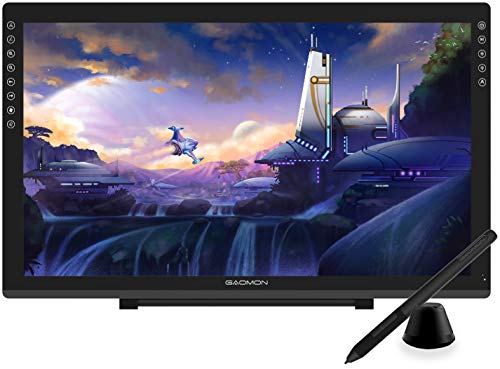 GAOMON PD2200 Drawing TabletBest Overall | 21.5 in | — | 9.1/10 | Check on Amazon → |
| 2 |  UGEE UE12 11.6 inch Drawing TabletSecond Pick | — | — | 9.0/10 | Check on Amazon → |
| 3 |  Simbans PicassoTab 12" Standalone Drawing TabletAlso Consider | — | — | 8.9/10 | Check on Amazon → |
| 4 |  PicassoTab 11" Standalone Drawing TabletAlso Consider | — | — | 8.8/10 | Check on Amazon → |
The lineup, one by one
GAOMON PD2200 Drawing Tablet
A 21.5-inch pen display with 130% sRGB, an 8192-level pen with tilt, and 8 touch keys.
Why #1: No single top figure here; its WiseScore comes from its overall specs plus Amazon sales data.
- Screen size
- 21.5 in
- Color gamut
- 130%
- Stylus included
- Yes
- Warranty
- 1 year
Good fit if
- You animate on a computer with a 21.5-inch screen.
- You want 130% sRGB color for digital art.
Look elsewhere if
- You want a standalone tablet with no computer.
- You want a 2K screen on the tablet.
This GAOMON runs a 21.5-inch full-laminated screen with 130% sRGB and 92% NTSC color. Its battery-free AP32 pen gives 8192 pressure levels with tilt support, and 8 replacement nibs sit inside the pen holder. Eight touch shortcut keys customize through the GAOMON driver, and an adjustable stand holds the display. The 1000:1 contrast ratio pairs with a 25MS response time and 89° viewing angles in both directions. An anti-glare film comes pre-applied. The tablet is not standalone: it must connect to a laptop or computer running Windows 7 or above, or Mac OS 10.12 or above, and it works with Photoshop, Illustrator, Krita, and other drawing software. The display area measures 476.64 x 268.11mm, or 18.8 x 10.6 inches. It works for online teaching, meetings, annotating, and signing files. It carries a 1-year warranty.
UGEE UE12 11.6 inch Drawing Tablet
An 11.6-inch pen display with a 1920x1080 screen, 124% sRGB, and 16K-level pressure.
Why #2: No single top figure here; its WiseScore comes from its overall specs plus Amazon sales data.
- Color gamut
- 124%
- Resolution
- 1920*1080
- Stylus included
- Yes
Good fit if
- You draw on an 11.6-inch screen at 124% sRGB.
- You want 16K-level pressure with 60° tilt.
Look elsewhere if
- You want a standalone tablet with no computer.
- You want a 21.5-inch screen for animation.
This UGEE runs an 11.6-inch full-laminated anti-glare screen at 1920x1080 with 124% sRGB color. Three color spaces switch on the tablet: sRGB, Adobe RGB, and DCI-P3. Its battery-free stylus gives 16K-level pressure sensitivity with 60° tilt recognition, plus two programmable hot keys and eight replacement nibs. Eight customizable shortcut keys use a concave-convex design for blind operation. Dual Type-C ports take a single full-featured USB-C cable, and the tablet connects to Windows, macOS, Android, and Chrome systems. The stylus body has a slender pencil-like design for a comfortable grip. It supports drawing, animation, image editing, and 3D sculpture. It works with Photoshop, Illustrator, Manga Studio, CorelPainter, and ibis.
Simbans PicassoTab 12" Standalone Drawing Tablet
A 12-inch standalone tablet with a laminated 2K screen, a 4096-level pen, and 6GB RAM.
Why #3: No single top figure here; its WiseScore comes from its overall specs plus Amazon sales data.
- Resolution
- 2K
- Stylus included
- Yes
- Warranty
- 1 Year
Good fit if
- You want a standalone tablet with no computer.
- You want a 12-inch 2K screen for animation.
Look elsewhere if
- You want a 21.5-inch screen for animation.
- You want the 16K-level pressure sensitivity of the UGEE.
This Simbans PicassoTab A12 runs standalone with no computer needed, on a 12-inch laminated 2K screen. Its Picasso Pen 3 gives 4096 pressure levels with palm rejection. An octa-core CPU pairs with 6GB RAM and 128GB storage, expandable to 1TB, on Android 15. Six bonus items come in the box: a tablet case, a drawing glove, a universal power adapter, a pre-installed screen protector, a lifetime PRO upgrade for the Concepts drawing app, and a lifetime VIP upgrade for the Artixo tutorials app. The laminated screen reduces parallax and enhances accuracy. The tablet handles drawing apps, schoolwork, streaming, and multitasking. GMS, FCC, and CE certification cover the tablet, and it carries a 1-year warranty.
PicassoTab 11" Standalone Drawing Tablet
An 11-inch standalone tablet with a laminated 2K screen, a 4096-level pen, and 6GB RAM.
Why #4: No single top figure here; its WiseScore comes from its overall specs plus Amazon sales data.
- Resolution
- 2K
- Stylus included
- Yes
- Warranty
- 1 Year
Good fit if
- You want a standalone tablet with no computer.
- You want a compact 11-inch screen for drawing.
Look elsewhere if
- You want a 12-inch screen for animation.
- You want the 16K-level pressure sensitivity of the UGEE.
This PicassoTab X11 runs standalone with no computer needed, on an 11-inch laminated 2K screen. Its 4096-level pressure-sensitive stylus gives precise strokes for sketching, shading, and illustration. An octa-core processor pairs with 6GB RAM and 128GB storage, expandable up to 1TB. Five creative apps come preloaded for sketching, painting, animation, tutorials, and guided lessons. Six bonus items come in the box: a tablet case, a drawing glove, a universal power adapter, a pre-installed screen protector, a lifetime Pro upgrade for Concepts, and a lifetime VIP upgrade for Artixo. The fully laminated 11-inch 2K screen reduces parallax and glare for a paper-like drawing feel. The Xplore app provides drawing guides and instant help. GMS, FCC, and CE certification cover the tablet, and it carries a 1-year warranty.
Worth the splurge, and what you can skip
Worth the splurge
- A 21.5-inch screen. The GAOMON PD2200 is the pick with a 21.5-inch screen, so choose it when animation work calls for that screen area.
- 16K-level pressure sensitivity. The UGEE UE12 is the pick with 16K-level pressure sensitivity, so choose it when fine line work calls for that pressure range.
Fine to skip
- A standalone tablet. The PicassoTab A12 and X11 run standalone with no computer needed, so skip that feature when the GAOMON 21.5-inch screen already covers your animation work on a computer.
- A 2K laminated screen. The PicassoTab A12 and X11 carry laminated 2K screens, so skip that feature when the UGEE 1920x1080 full-laminated screen already covers your drawing.
Deciding factors for art tablets
Screen size and resolution
Screen size runs from 21.5 inches on the GAOMON PD2200 down to 11 inches on the PicassoTab X11. The GAOMON screen is full-laminated with 130% sRGB and 92% NTSC color, and its display area measures 476.64 x 268.11mm, or 18.8 x 10.6 inches. The UGEE UE12 runs an 11.6-inch full-laminated screen at 1920x1080 with 124% sRGB color, and its screen switches between sRGB, Adobe RGB, and DCI-P3 color spaces. The Simbans PicassoTab A12 runs a 12-inch laminated 2K screen, and the PicassoTab X11 runs an 11-inch laminated 2K screen. The GAOMON max viewing angle runs 89° in both directions, and its contrast ratio is 1000:1 with a 25MS response time.
Pressure levels and stylus
Pressure sensitivity runs from 16K-level on the UGEE UE12 to 8192 levels on the GAOMON PD2200 and 4096 levels on the PicassoTab A12 and X11. The GAOMON battery-free AP32 pen gives 8192 pressure levels with tilt support, and 8 replacement nibs sit inside the pen holder. The UGEE battery-free stylus gives 16K-level pressure with 60° tilt recognition and two programmable hot keys, and its stylus body has a slender pencil-like design. The UGEE package holds eight replacement nibs, and its eight shortcut keys use a concave-convex design for blind operation. The A12 Picasso Pen 3 gives 4096 pressure levels with palm rejection, and the X11 stylus gives 4096 levels.
Standalone, systems, and warranty
The PicassoTab A12 and X11 run standalone with no computer needed, while the GAOMON PD2200 must connect to a laptop or computer to work. The UGEE UE12 connects through a single full-featured USB-C cable to Windows, macOS, Android, and Chrome systems. The GAOMON works with Windows 7 or above and Mac OS 10.12 or above. The GAOMON works with Photoshop, SAI version 2, Illustrator, Krita, FireAlpaca, GIMP, SketchBook Pro, and MediBang Paint Pro, and the UGEE works with Photoshop, Illustrator, Manga Studio, CorelPainter, and ibis. Warranty runs 1 year on the GAOMON, the A12, and the X11. The A12 runs Android 15 with an octa-core CPU, 6GB RAM, and 128GB storage expandable to 1TB.
FAQ about art tablets
Which of these tablets work without a computer?
The Simbans PicassoTab A12 and the PicassoTab X11 run standalone with no computer needed. The GAOMON PD2200 must connect to a laptop or computer to work. The UGEE UE12 connects through a single USB-C cable to computers, laptops, and Android phones and tablets.
What screen sizes do these drawing tablets have?
The GAOMON PD2200 has a 21.5-inch screen, the UGEE UE12 has an 11.6-inch screen, the Simbans PicassoTab A12 has a 12-inch screen, and the PicassoTab X11 has an 11-inch screen. The GAOMON screen is full-laminated with 130% sRGB, and the UGEE screen is full-laminated at 1920x1080.
How many pressure levels do the styluses have?
The GAOMON PD2200 pen gives 8192 pressure levels, the UGEE UE12 stylus gives 16K-level pressure sensitivity, and the PicassoTab A12 and X11 pens give 4096 pressure levels. The GAOMON and UGEE pens are battery-free, and the A12 pen adds palm rejection.
Bottom line
Keep comparing
More computers & office guides, ranked with the same WiseScore method.

Written by Nathan Reeve, WiseSplurge editor
Specs come from each maker's Amazon listing and were last checked on November 29, 2026. Each WiseScore (out of 10) blends those specs with Amazon sales data. We compare published figures rather than testing products in person.