Best 3060 Gpu for Gaming (2026)

We earn a commission when you buy through our links, at no extra cost to you. As an Amazon Associate I earn from qualifying purchases.
Quick answer
Choose the EVGA GeForce RTX 3060 XC Gaming if you want 12GB GDDR6 memory with a 1.88 GHz boost clock for gaming. It pairs that memory figure with dual fans and a metal backplate. All four cards here have 12GB GDDR6, so clock figures, fan design and outputs separate them.
Ranked at a glance
| # | Product | VRAM | Boost clock | WiseScore | Link |
|---|---|---|---|---|---|
| 1 | 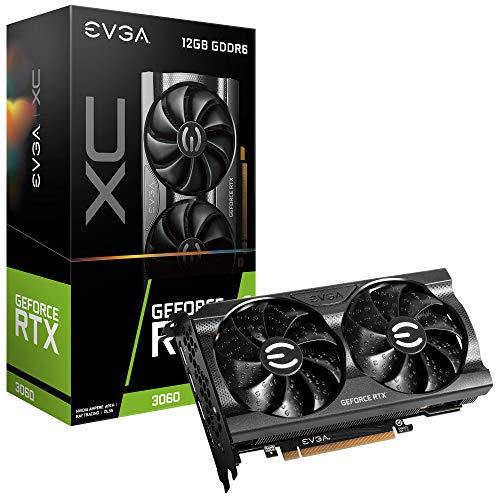 EVGA GeForce RTX 3060 XC GamingBest Overall | 12 GB | 1.88 GHz | 9.6/10 | Check on Amazon → |
| 2 |  MSI Gaming GeForce RTX 3060 12GB 15Second Pick | 12 GB | — | 9.5/10 | Check on Amazon → |
| 3 | 12 GB | — | 9.2/10 | Check on Amazon → | |
| 4 | 12 GB | — | 9.1/10 | Check on Amazon → |
The lineup, one by one
EVGA GeForce RTX 3060 XC Gaming
12GB GDDR6, a 1882 MHz boost clock, dual fans and a metal backplate define this EVGA card for gaming.
Why #1: No single top figure here; its WiseScore comes from its overall specs plus Amazon sales data.
- VRAM
- 12 GB
- Boost clock
- 1.88 GHz
- Warranty
- 3 year
Good fit if
- You play games and want a 1882 MHz boost clock
- You want dual fans with a metal backplate on the card
Look elsewhere if
- You need the Single Fan size of the ASUS Phoenix
- You need an Axial-tech fan design on the card
This EVGA card has 12GB GDDR6 memory, stated as 12288 MB GDDR6, with a real boost clock of 1882 MHz. Dual fans handle cooling, and an all-metal backplate covers the back of the card. The EVGA card has real-time ray tracing in games. The model number is 12G-P5-3657-KR. Warranty coverage is 3 year. Keep the 12288 MB GDDR6 figure with the 1882 MHz boost clock figure.
MSI Gaming GeForce RTX 3060 12GB 15
12GB GDDR6, three DisplayPort outputs, one HDMI output and a Torx Twin Fan design define this MSI card.
Why #2: No single top figure here; its WiseScore comes from its overall specs plus Amazon sales data.
- VRAM
- 12 GB
- Warranty
- 3 Years
Good fit if
- You connect three DisplayPort displays and one HDMI display
- You want a 7680 x 4320 maximum display resolution figure
Look elsewhere if
- You need the 1882 MHz boost clock of the EVGA card
- You need a metal backplate on the graphics card
This MSI card has 12GB GDDR6 memory with a 1710 MHz GPU clock speed and an 1807 MHz memory clock speed. Outputs are DisplayPort x 3 at v1.4a and HDMI 2.1 x 1, with a 7680 x 4320 maximum display resolution. The interface is PCIe 4, and cooling uses a Torx Twin Fan design. The model is the RTX 3060 Ventus 2X 12G OC. Warranty coverage is 3 Years. Count your display cables against the three DisplayPort outputs and the single HDMI output. Keep the 7680 x 4320 resolution figure with the output counts.

ASUS Phoenix NVIDIA GeForce RTX 3060 V2 Gaming Graphics Card
12GB GDDR6, a Single Fan size, Axial-tech fan design and a 650W recommended PSU figure define this ASUS Phoenix card.
Why #3: No single top figure here; its WiseScore comes from its overall specs plus Amazon sales data.
- VRAM
- 12 GB
- Warranty
- 3 Year
Good fit if
- Your case fits a Single Fan size card
- You plan a build around a 650W recommended PSU figure
Look elsewhere if
- You need dual fans on the graphics card
- You need three DisplayPort outputs for your displays
This ASUS Phoenix card has 12GB GDDR6 memory with a memory speed of 15 Gbps and a digital max resolution of 7680 x 4320. The interface is PCIe 4.0, with HDMI 2.1 and DisplayPort 1.4a outputs. Cooling uses an Axial-tech fan design with a smaller fan hub, longer blades and a barrier ring, plus dual ball fan bearings and a protective backplate. Size is Single Fan. The recommended PSU figure is 650W. Warranty coverage is 3 Year. Measure your case against the Single Fan size first. Keep the 15 Gbps memory speed figure with the 650W PSU figure.
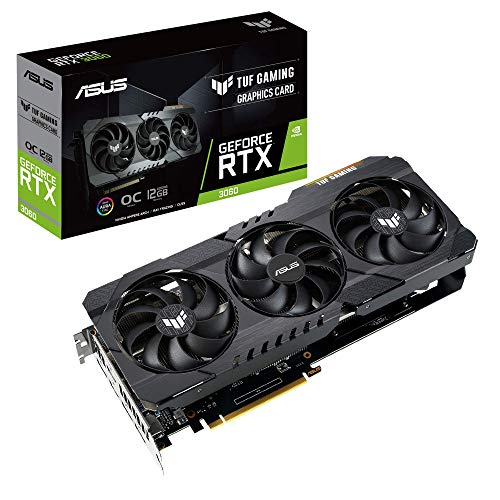
ASUS TUF Gaming NVIDIA GeForce RTX 3060 OC Graphics Card
12GB GDDR6, PCIe 4.0, HDMI 2.1, DisplayPort 1.4a and dual ball fan bearings define this ASUS TUF card.
Why #4: No single top figure here; its WiseScore comes from its overall specs plus Amazon sales data.
- VRAM
- 12 GB
- Warranty
- 3 years
Good fit if
- You connect displays through HDMI 2.1 and DisplayPort 1.4a
- You want dual ball fan bearings on the card
Look elsewhere if
- You need a Torx Twin Fan cooling design
- You need the 1882 MHz boost clock of the EVGA card
This ASUS TUF card has 12GB GDDR6 memory on a PCIe 4.0 interface, with HDMI 2.1 and DisplayPort 1.4a outputs. The Axial-Tech fan design uses more fan blades and a reversed rotational direction for the center fan. The card has dual ball fan bearings and Military-Grade Certification. The model is the TUF-RTX3060-O12G-GAM. Warranty coverage is 3 years. Check your motherboard slot against the PCIe 4.0 interface figure. Keep the HDMI 2.1 and DisplayPort 1.4a figures with the PCIe 4.0 figure.
Worth the splurge, and what you can skip
Worth the splurge
- A 1.88 GHz boost clock. The EVGA GeForce RTX 3060 XC Gaming has the 1.88 GHz boost clock, so choose it when your gaming requirement calls for that boost clock over the 1710 MHz GPU clock speed of the MSI card.
- Three DisplayPort outputs. The MSI Gaming GeForce RTX 3060 has DisplayPort x 3 and HDMI 2.1 x 1, so choose it when your display setup needs three DisplayPort connections plus one HDMI connection at the same time.
Fine to skip
- Military-Grade Certification. If your requirement is 12GB GDDR6 with a 3 year warranty, the EVGA GeForce RTX 3060 XC Gaming already covers that requirement with its 12GB figure and 3 year term.
- A Single Fan size. If your case fits a dual fan card, the EVGA GeForce RTX 3060 XC Gaming already covers that requirement with dual fans, 12GB GDDR6 and a 1882 MHz boost clock.
Deciding factors for graphics cards
Boost clock and memory figures
Memory capacity does not separate these four cards, since each one has 12GB GDDR6. Clock figures do. The EVGA GeForce RTX 3060 XC Gaming has a real boost clock of 1882 MHz, also written as 1.88 GHz. The MSI Gaming GeForce RTX 3060 has a 1710 MHz GPU clock speed, an 1807 MHz memory clock speed and a 15 Gbps memory speed figure. The ASUS Phoenix states 15 Gbps memory speed and no GPU clock figure. Keep GPU clock, memory clock and memory speed as separate figures, since each one describes a different part of the card. The EVGA boost figure to carry forward is 1882 MHz.
Fan design and card size
Fan design and size decide fit inside a case. The EVGA GeForce RTX 3060 XC Gaming uses dual fans with an all-metal backplate. The MSI Gaming GeForce RTX 3060 uses a Torx Twin Fan design. The ASUS Phoenix NVIDIA GeForce RTX 3060 V2 uses an Axial-tech fan design in a Single Fan size, with a smaller fan hub, longer blades and a barrier ring. The ASUS TUF Gaming NVIDIA GeForce RTX 3060 OC uses an Axial-Tech fan design with more fan blades and a reversed rotational direction for the center fan, plus dual ball fan bearings. The Phoenix size figure to check against your case is Single Fan. The MSI fan figure to compare is Torx Twin Fan.
Outputs, resolution and power supply
Outputs and resolution figures decide display connections. The MSI Gaming GeForce RTX 3060 has DisplayPort x 3 at v1.4a and HDMI 2.1 x 1, with a 7680 x 4320 maximum display resolution. The ASUS Phoenix NVIDIA GeForce RTX 3060 V2 has HDMI 2.1 and DisplayPort 1.4a outputs with a digital max resolution of 7680 x 4320. The ASUS TUF Gaming NVIDIA GeForce RTX 3060 OC has HDMI 2.1 and DisplayPort 1.4a outputs on a PCIe 4.0 interface. The ASUS Phoenix also carries a recommended PSU figure of 650W. The power supply figure to plan around is 650W. The MSI interface figure to check against your motherboard is PCIe 4.
FAQ about graphics cards
How much VRAM does an RTX 3060 graphics card have?
Each card here has 12GB GDDR6 memory. The EVGA GeForce RTX 3060 XC Gaming states that figure as 12288 MB GDDR6. The MSI, ASUS Phoenix and ASUS TUF cards each state 12GB GDDR6, so VRAM capacity does not separate these four picks.
What power supply does an RTX 3060 need?
The ASUS Phoenix NVIDIA GeForce RTX 3060 V2 states a recommended PSU of 650W. That 650W figure belongs to the Phoenix card. Check the manual for the exact card you buy before you choose a power supply for your build.
How long is the warranty on an RTX 3060 graphics card?
Each card here states a 3 year warranty term. The EVGA card states 3 year, the MSI card states 3 Years, the ASUS Phoenix states 3 Year and the ASUS TUF card states 3 years. Keep the warranty term with your receipt.
Bottom line
Compare before you buy
Side-by-side comparisons that include graphics cards, checked with the same spec data.
Keep comparing
More computers & office guides, ranked with the same WiseScore method.

Written by Nathan Reeve, WiseSplurge editor
Specs come from each maker's Amazon listing and were last checked on November 29, 2026. Each WiseScore (out of 10) blends those specs with Amazon sales data. We compare published figures rather than testing products in person.