Best Hard Drive for Desktop (2026)

We earn a commission when you buy through our links, at no extra cost to you. As an Amazon Associate I earn from qualifying purchases.
Quick answer
Choose the Western Digital 8TB Elements Desktop External Hard Drive if you want plug-and-play add-on storage for a Windows PC with 8TB in one desktop drive. Capacity separates these five picks, from 2TB in the Seagate BarraCuda internal drive to 16TB in two desktop drives. This 8TB Elements drive weighs 2.09 lb and carries a 2-year limited warranty.
Ranked at a glance
| # | Product | Storage | Read speed | WiseScore | Link |
|---|---|---|---|---|---|
| 1 | 8000 GB | — | 9.3/10 | Check on Amazon → | |
| 2 |  Seagate 16TB One Touch Desktop Hard DriveSecond Pick | — | — | 9.2/10 | Check on Amazon → |
| 3 |  Seagate BarraCuda 2TB Internal Hard DriveAlso Consider | 2000 GB | — | 9.1/10 | Check on Amazon → |
| 4 | — | — | 9.0/10 | Check on Amazon → | |
| 5 | — | — | 8.8/10 | Check on Amazon → |
The lineup, one by one

Western Digital 8TB Elements Desktop External Hard Drive
An 8TB USB 3.0 desktop drive with plug-and-play setup for Windows PCs at 2.09 lb.
Why #1: No single top figure here; its WiseScore comes from its overall specs plus Amazon sales data.
- Storage
- 8000 GB
- Weight
- 2.09 lb
- Warranty
- 2-year
Good fit if
- You want 8TB of plug-and-play storage for a Windows PC
- You keep business and personal files in 8TB of desktop storage
Look elsewhere if
- You need the 16TB capacity of the WD 16TB Elements drive
- You need the SATA 6Gb/s internal connection of the BarraCuda
This Western Digital 8TB Elements Desktop External Hard Drive holds 8TB in a black desktop enclosure with a USB 3.0 connection. Setup is plug-and-play for Windows PCs, and the drive serves business and personal storage as add-on capacity for a desktop. It weighs 2.09 lb, so the enclosure stays on the desk rather than in a pocket. The warranty is a 2-year limited warranty. Fast data transfers run over the USB 3.0 connection.
Seagate 16TB One Touch Desktop Hard Drive
A 16TB bus-powered USB-C desktop drive with a two-year warranty and Rescue services.
Why #2: No single top figure here; its WiseScore comes from its overall specs plus Amazon sales data.
- Weight
- 2.59 lb
- Warranty
- two-year
Good fit if
- You back up assignments and projects in 16TB of storage
- You want one USB-C cable with 15W bus power
Look elsewhere if
- You need the 1.24 lb weight of the WD 16TB Elements drive
- You need the USB 3.0 connection of the WD 8TB Elements drive
This Seagate 16TB One Touch Desktop Hard Drive holds 16TB and connects by bus-powered USB-C, so one cable carries the connection with no wall outlet required. The drive requires 15W USB-C power from the host. It comes with a two-year limited warranty and Rescue Data Recovery Services, plus Adobe CC and Mylio photo trials. The Space Gray enclosure weighs 2.59 lb. Backup use covers assignments, projects and sensitive files kept in one place across the 16TB capacity.
Seagate BarraCuda 2TB Internal Hard Drive
A 2TB 3.5-inch internal SATA drive at 7200 RPM with a 256MB cache.
Why #3: No single top figure here; its WiseScore comes from its overall specs plus Amazon sales data.
- Storage
- 2000 GB
- Weight
- 0.99 lb
- Warranty
- 2-year
Good fit if
- You build a desktop setup around a 2TB SATA drive
- You edit photos and video on a 7200 RPM drive
Look elsewhere if
- You need the 16TB capacity of the Seagate One Touch drive
- You need the USB 3.0 external connection of the WD Elements
This Seagate BarraCuda 2TB Internal Hard Drive is a 3.5-inch internal drive with a SATA 6Gb/s connection, a 7200 RPM spindle speed and a 256MB cache. It weighs 0.99 lb and carries a 2-year limited warranty. The free Seagate DiscWizard software tool migrates and clones data from old drives during a move to this drive. Desktop uses cover music, video, photo editing and PC gaming on a SATA connection inside the computer.

Western Digital WD 16TB Elements Desktop External Hard Drive
A 16TB USB 3.0 desktop drive with plug-and-play setup for Windows PCs at 1.24 lb.
Why #4: No single top figure here; its WiseScore comes from its overall specs plus Amazon sales data.
- Weight
- 1.24 lb
- Warranty
- 2-year
Good fit if
- Your desktop files need 16TB in one external drive
- You keep personal files in 16TB of storage at 1.24 lb
Look elsewhere if
- You need the bus-powered USB-C connection of the Seagate One Touch
- You need the 0.99 lb weight of the Seagate BarraCuda drive
This Western Digital WD 16TB Elements Desktop External Hard Drive holds 16TB in a black desktop enclosure with a USB 3.0 connection. Setup is plug-and-play for Windows PCs, and the drive serves personal storage as add-on capacity for a desktop. It weighs 1.24 lb and carries a 2-year limited warranty. The enclosure carries WD quality inside and out, with high-capacity add-on storage for personal files on the desktop.
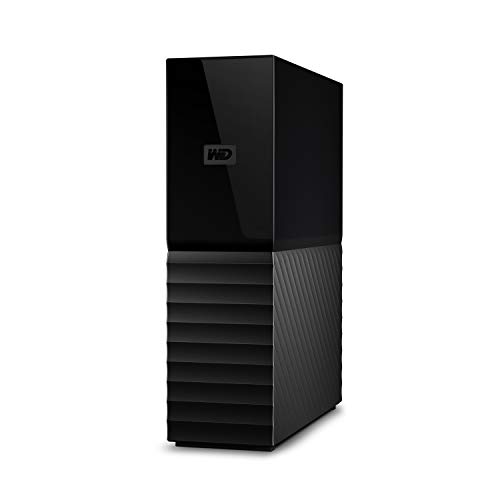
WD Western Digital 6TB My Book Desktop External Hard Drive
A 6TB USB 3.0 desktop drive with 256-bit AES encryption and password protection.
Why #5: No single top figure here; its WiseScore comes from its overall specs plus Amazon sales data.
- Weight
- 2.31 lb
- Warranty
- 2-year
Good fit if
- You protect desktop files with 256-bit AES hardware encryption
- You back up 6TB with password protection software
Look elsewhere if
- You need the 8TB capacity of the WD 8TB Elements drive
- You need the 1.24 lb weight of the WD 16TB Elements drive
This WD Western Digital 6TB My Book Desktop External Hard Drive holds 6TB in this configuration, with a USB 3.0 connection at SuperSpeed USB 5 Gbps and USB 2.0 compatibility. It has 256-bit AES hardware encryption and software for device management and backup with password protection, and that software requires download and installation. It weighs 2.31 lb and carries a 2-year limited warranty. Desktop uses cover business and personal storage across the installed 6TB capacity.
Worth the splurge, and what you can skip
Worth the splurge
- A 16TB desktop capacity. The Seagate One Touch and the WD 16TB Elements hold 16TB in one enclosure, so choose either drive when your desktop files need 16TB in a single drive.
- Bus-powered USB-C at 15W. The Seagate One Touch runs on bus-powered USB-C with one cable at 15W, so choose it when your desk setup needs a desktop drive with no wall outlet.
Fine to skip
- A 7200 RPM SATA drive. If your storage sits outside the computer on USB 3.0, the WD 8TB Elements already covers that requirement at 8TB, so the internal SATA drive adds a build step you would not use.
- 256-bit AES hardware encryption. If your desktop files need plain add-on storage at 16TB, the WD 16TB Elements already covers that requirement, so the My Book encryption adds protection steps you would not use.
Deciding factors for hard drives
Capacity across the five drives
Installed capacity runs from 2TB in the Seagate BarraCuda internal drive to 16TB in the Seagate One Touch and the WD 16TB Elements desktop drives. Between those figures sit the 6TB WD My Book and the 8TB WD Elements desktop drives. The BarraCuda mounts inside a desktop on a SATA connection, while the other four drives sit outside the computer as desktop enclosures. Compare each installed figure against the files you plan to keep on that drive, since the 6TB My Book configuration holds 6TB even where its family description reaches higher. The spread on this page ends at 16TB.
Connections and power
Three desktop drives connect by USB 3.0: the WD 8TB Elements, the WD 16TB Elements and the WD 6TB My Book. The My Book states SuperSpeed USB at 5 Gbps with USB 2.0 compatibility. The Seagate One Touch connects by bus-powered USB-C with one cable and requires 15W USB-C power, with no wall outlet required. The Seagate BarraCuda connects inside the computer by SATA 6Gb/s as a 3.5-inch internal drive. The WD 8TB Elements and WD 16TB Elements state plug-and-play setup for Windows PCs on that USB 3.0 connection. Keep the external USB figures separate from the internal SATA figure when you plan a desktop build around 6Gb/s.
Warranty, weight and software
Each drive carries a 2-year limited warranty, and the Seagate One Touch adds Rescue Data Recovery Services with Adobe CC and Mylio photo trials. Weights run from 0.99 lb on the BarraCuda internal drive to 2.59 lb on the One Touch enclosure, with the WD 16TB Elements at 1.24 lb. Software differs by drive: DiscWizard migrates and clones data for the BarraCuda, while the My Book software handles device management and backup with password protection after download and installation. The WD 8TB Elements weighs 2.09 lb and the WD My Book weighs 2.31 lb in their desktop enclosures. The My Book also has 256-bit AES hardware encryption across its 6TB.
FAQ about hard drives
How much storage do these desktop drives hold?
The WD 8TB Elements holds 8TB, the Seagate One Touch and WD 16TB Elements each hold 16TB, the WD My Book holds 6TB, and the Seagate BarraCuda internal drive holds 2TB in this configuration. Each figure is the installed capacity of the named configuration on this page.
Which drives connect by USB-C or SATA?
The Seagate One Touch connects by bus-powered USB-C and requires 15W USB-C power. The Seagate BarraCuda connects by SATA 6Gb/s inside the computer. The WD Elements drives and the WD My Book connect by USB 3.0.
How long is the warranty on these hard drives?
Each drive on this page carries a 2-year limited warranty. The Seagate One Touch adds Rescue Data Recovery Services to its two-year limited warranty, and the other four drives state the 2-year limited term. The One Touch trial software covers Adobe CC and Mylio photo use.
Bottom line
Compare before you buy
Side-by-side comparisons that include hard drives, checked with the same spec data.
Keep comparing
More computers & office guides, ranked with the same WiseScore method.

Written by Nathan Reeve, WiseSplurge editor
Specs come from each maker's Amazon listing and were last checked on November 29, 2026. Each WiseScore (out of 10) blends those specs with Amazon sales data. We compare published figures rather than testing products in person.