Best 8tb External Hard Drive for Mac (2026)

We earn a commission when you buy through our links, at no extra cost to you. As an Amazon Associate I earn from qualifying purchases.
Quick answer
Pick the Seagate One Touch Hub 8TB External Hard Drive if you want an 8TB desktop drive for a Mac that also works as a USB hub, with front USB-C and USB 3.0 ports for connecting and recharging devices. The OSENTRiX BX100 answers with USB 3.2 Gen 2 at up to 10Gbps, and the G-Technology G-DRIVE answers with Thunderbolt, while the Seagate Expansion keeps it to plain USB 3.0 alone.
Ranked at a glance
| # | Product | Storage | WiseScore | Link |
|---|---|---|---|---|
| 1 |  Seagate One Touch Hub 8TB External Hard DriveBest Overall | 8000 GB | 9.8/10 | Check on Amazon → |
| 2 | 8000 GB | 9.5/10 | Check on Amazon → | |
| 3 |  OSENTRiX BX100 8TB USB 3.2 Gen 2Also Consider | 8000 GB | 9.4/10 | Check on Amazon → |
| 4 | 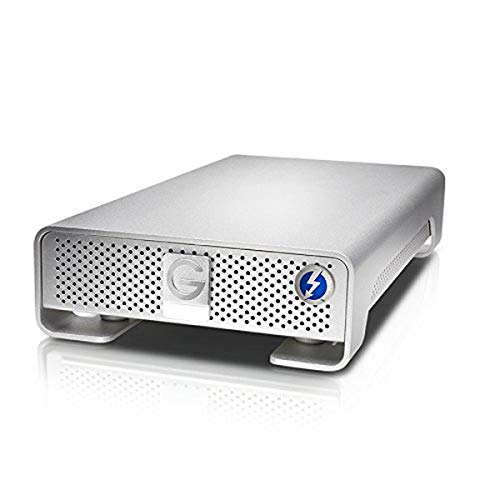 G-Technology 8TB G-DRIVEAlso Consider | 8000 GB | 9.3/10 | Check on Amazon → |
The lineup, one by one
Seagate One Touch Hub 8TB External Hard Drive
An 8TB desktop drive for Mac and Windows with front USB-C and USB 3.0 hub ports and Toolkit backup software.
Why #1: No single top figure here; its WiseScore comes from its overall specs plus Amazon sales data.
- Storage
- 8000 GB
- USB version
- USB-C and USB 3.0
Good fit if
- You want an 8TB drive that doubles as a USB hub on your desk
- You want one-click and scheduled backups through Seagate Toolkit software
Look elsewhere if
- You want USB 3.2 Gen 2 speeds up to 10Gbps like the OSENTRiX BX100
- You want a Thunderbolt port like the G-Technology G-DRIVE
The One Touch Hub gives your Mac an 8TB desktop drive with a front-facing USB-C port and a USB 3.0 port for connecting and recharging devices, even when the computer is off. Password protection guards the drive, and Seagate Toolkit backup software handles one-click and scheduled backups plus file mirroring. The drive works with Windows and Mac computers out of the box. The drive stores files for a desktop workstation PC, a laptop or a Mac. The included limited warranty and Rescue Data Recovery Services add cover for the drive.
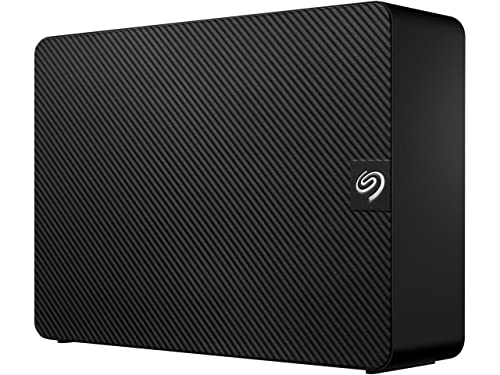
Seagate 8TB 3.5" Expansion Desktop USB 3.0 External Hard Drive
An 8TB desktop drive with USB 3.0 for adding storage to a PC or Mac.
Why #2: No single top figure here; its WiseScore comes from its overall specs plus Amazon sales data.
- Storage
- 8000 GB
- USB version
- USB 3.0
Good fit if
- You want simple add-on 8TB storage for your PC or Mac
- You want an easy-to-use desktop drive with USB 3.0
Look elsewhere if
- You want front hub ports for recharging devices like the One Touch Hub
- You want USB 3.2 Gen 2 speeds up to 10Gbps like the OSENTRiX BX100
The Seagate Expansion adds 8TB of desktop storage to a PC or Mac through USB 3.0. The 3.5-inch desktop drive is an easy-to-use storage solution for a computer that needs more room for files. It works with Windows and Mac computers, and the desktop form sits on a desk beside the computer. The USB 3.0 connection links the drive to a PC or a Mac directly. The part number is STKP8000400, and the drive comes in black.
OSENTRiX BX100 8TB USB 3.2 Gen 2
An 8TB USB-C drive with USB 3.2 Gen 2 at up to 10Gbps and a 7200 RPM drive inside.
Why #3: No single top figure here; its WiseScore comes from its overall specs plus Amazon sales data.
- Storage
- 8000 GB
- Warranty
- 2 Year
- USB version
- USB 3.2 Gen 2
Good fit if
- You want USB 3.2 Gen 2 transfer speeds up to 10Gbps
- You want a 7200 RPM drive built for 24/7 operation
Look elsewhere if
- You want front hub ports for recharging devices like the One Touch Hub
- You want a Thunderbolt port like the G-Technology G-DRIVE
The OSENTRiX BX100 gives a Mac or Windows computer 8TB of storage over USB-C with USB 3.2 Gen 2, at transfer speeds up to 10Gbps. A 7200 RPM hard drive sits inside, built for 24/7 operation. The drive is plug-and-play on Windows and macOS with no software installation, and the fanless cooling system runs whisper-quiet. The enclosure is built for long-term durability, and the drive carries a 2-year warranty. The drive expands storage instantly for backups, media libraries and system storage. Formatting leaves an estimated 7TB of capacity.
G-Technology 8TB G-DRIVE
An 8TB desktop drive with Thunderbolt and USB 3.0, formatted for Mac.
Why #4: No single top figure here; its WiseScore comes from its overall specs plus Amazon sales data.
- Storage
- 8000 GB
- Warranty
- 3 year
- USB version
- Thunderbolt and USB 3.0
Good fit if
- You want a Thunderbolt port for high speed data transfer
- You want a drive formatted for Mac and easily reformatted for Windows
Look elsewhere if
- You want backup software with scheduled backups like the One Touch Hub
- You want a 7200 RPM drive built for 24/7 operation like the OSENTRiX BX100
The G-Technology G-DRIVE gives a Mac an 8TB desktop drive with Thunderbolt and USB 3.0 ports for high speed data transfer. The solid all-aluminum case holds an integrated heat sink for quiet operation and cooling. The drive arrives formatted for Mac and reformats easily for Windows, and it carries a 3-year limited manufacturer warranty. The case is silver, and the drive handles digital video, music and photo files. The G-DRIVE line offers capacities up to 10TB, while this pick holds 8TB.
Worth the splurge, and what you can skip
Worth the splurge
- A Thunderbolt port. The G-Technology G-DRIVE is the pick with Thunderbolt, and buyers who want that high speed connection for a Mac need it.
- USB 3.2 Gen 2 at 10Gbps. The OSENTRiX BX100 is the pick with USB 3.2 Gen 2, and buyers who want quick backups want transfer speeds up to 10Gbps.
Fine to skip
- A front USB hub. Buyers who only need storage can skip the One Touch Hub ports and use the USB 3.0 of the Seagate Expansion instead.
- A 7200 RPM drive. Buyers who do not run a drive around the clock can skip the OSENTRiX BX100 and use the 8TB storage of the Seagate Expansion instead.
Deciding factors for external hard drives
USB-C, USB 3.2 Gen 2 and Thunderbolt
The connection is the main split in this lineup. The Seagate One Touch Hub uses USB-C and USB 3.0, with front ports that connect and recharge devices even when the computer is off. The OSENTRiX BX100 uses USB-C with USB 3.2 Gen 2 at transfer speeds up to 10Gbps. The G-Technology G-DRIVE pairs Thunderbolt with USB 3.0 for high speed data transfer. The Seagate Expansion uses USB 3.0 alone. USB-C appears on the Hub and the BX100, while USB 3.0 appears on every pick except the BX100. Check the ports on your Mac against these four connections, and note that only the OSENTRiX states a 10Gbps figure. The hub ports on the One Touch Hub add a second job for the drive, since they recharge a device while the drive stores files.
Backup software and password protection
Backup software and protection split the picks. The Seagate One Touch Hub includes Toolkit backup software for one-click and scheduled backups and file mirroring, and password protection guards the drive. The OSENTRiX BX100 needs no software installation and works plug-and-play on Windows and macOS. The Toolkit software mirrors files as well as scheduling backups, so a copy of a file exists in a second place. Password protection on the One Touch Hub guards the files on the drive, and the included Rescue Data Recovery Services add a data recovery option. A buyer who wants scheduled backups and file mirroring finds them in the One Touch Hub, while the OSENTRiX suits a buyer who wants to plug in and start without installing software.
Capacity, formatting and warranty
Every pick holds 8TB of storage, so the choice turns on formatting, not capacity. The G-Technology G-DRIVE arrives formatted for Mac and reformats easily for Windows, and it carries a 3-year limited manufacturer warranty. The OSENTRiX BX100 carries a 2-year warranty and estimates 7TB of capacity after formatting. The One Touch Hub works with Windows and Mac out of the box, and the Seagate Expansion works with Windows and Mac. Formatting matters because a drive formatted for Mac needs reformatting for Windows, and the G-DRIVE states that step plainly. The G-DRIVE suits a Mac buyer who wants a 3-year limited manufacturer warranty. The One Touch Hub includes a two-year limited warranty, the OSENTRiX BX100 carries a 2-year warranty, and the G-DRIVE carries a 3-year limited manufacturer warranty.
FAQ about external hard drives
Which 8TB drive works with a Mac?
All four picks work with a Mac. The Seagate One Touch Hub and the Seagate Expansion work with Windows and Mac, the OSENTRiX BX100 works with Windows and macOS, and the G-Technology G-DRIVE arrives formatted for Mac. Each pick connects over USB or Thunderbolt.
Which pick states the highest USB speed?
The OSENTRiX BX100 uses USB-C with USB 3.2 Gen 2 at transfer speeds up to 10Gbps. The Seagate One Touch Hub uses USB-C and USB 3.0. The G-Technology G-DRIVE pairs Thunderbolt with USB 3.0, and the Seagate Expansion uses USB 3.0.
How long is the warranty on these 8TB drives?
The G-Technology G-DRIVE carries a 3-year limited manufacturer warranty, and the OSENTRiX BX100 carries a 2-year warranty. The Seagate One Touch Hub includes a limited warranty with Rescue Data Recovery Services. Warranty terms differ across the three picks that state one, so compare the stated years before choosing.
Bottom line
Compare before you buy
Side-by-side comparisons that include external hard drives, checked with the same spec data.
Keep comparing
More computers & office guides, ranked with the same WiseScore method.

Written by Nathan Reeve, WiseSplurge editor
Specs come from each maker's Amazon listing and were last checked on November 29, 2026. Each WiseScore (out of 10) blends those specs with Amazon sales data. We compare published figures rather than testing products in person.