Best 4tb External Hard Drive for Mac (2026)

We earn a commission when you buy through our links, at no extra cost to you. As an Amazon Associate I earn from qualifying purchases.
Quick answer
USB version separates these 4TB drives for Mac use, so choose the Toshiba Canvio Basics 4TB Portable External Hard Drive if you want USB 3.0 bus power with no AC cord and will reformat its NTFS formatting for Mac. It adds 4000 GB with Plug & Play setup and no software to install.
Ranked at a glance
| # | Product | Storage | WiseScore | Link |
|---|---|---|---|---|
| 1 | 4000 GB | 9.8/10 | Check on Amazon → | |
| 2 | 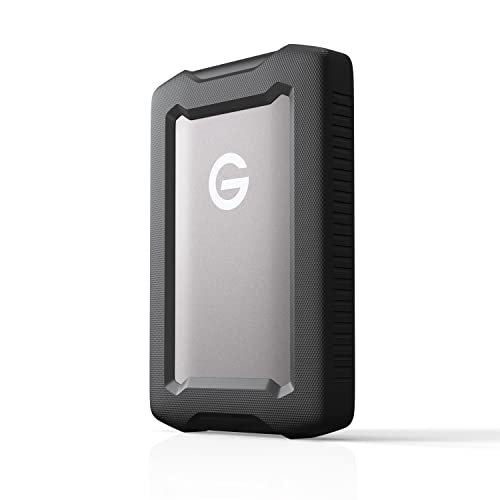 SanDisk Professional 4TB G-Drive ArmorATDSecond Pick | 4000 GB | 9.7/10 | Check on Amazon → |
| 3 |  ModusTech 4TB Desktop External Hard DriveAlso Consider | 4000 GB | 9.5/10 | Check on Amazon → |
| 4 |  LaCie Rugged Mini Portable External Hard DriveAlso Consider | 4000 GB | 9.4/10 | Check on Amazon → |
| 5 | 4000 GB | 9.3/10 | Check on Amazon → |
The lineup, one by one
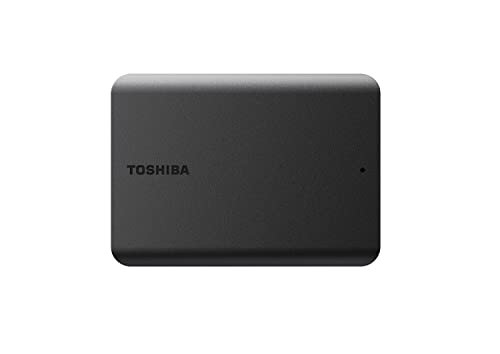
Toshiba Canvio Basics 4TB Portable External Hard Drive
The Toshiba Canvio Basics adds 4000 GB over USB 3.0 with bus power and Plug & Play setup.
Why #1: No single top figure here; its WiseScore comes from its overall specs plus Amazon sales data.
- Storage
- 4000 GB
- Warranty
- 1 year
- USB version
- USB 3.0
Good fit if
- You will reformat NTFS for Mac and want 4000 GB storage
- You want USB 3.0 bus power with no AC cord
Look elsewhere if
- You need a rugged drive with an easy-grip bumper
- You need a 3 year warranty on your drive
This portable drive has 4000 GB storage in the 4TB size with USB 3.0 and USB 2.0 compatibility. No external AC power cord is needed, and Plug & Play setup requires no software to install. The drive arrives pre-formatted NTFS for Windows PC, and reformatting is required for Mac computers. The black enclosure has a matte, smudge-resistance finish with a sleek profile design. Warranty is a 1 year standard limited warranty. The configuration suits Mac users who reformat before first use and carry the drive between computers.
SanDisk Professional 4TB G-Drive ArmorATD
The SanDisk G-Drive ArmorATD pairs 4000 GB with USB-C, macOS use out of the box, and rugged design.
Why #2: No single top figure here; its WiseScore comes from its overall specs plus Amazon sales data.
- Storage
- 4000 GB
- Warranty
- 3 year
- Rugged design
- Yes
- USB version
- USB 3.2 Gen 1
Good fit if
- You want macOS use right out of the box at 4000 GB
- You carry a rugged drive with an easy-grip bumper daily
Look elsewhere if
- You need a 7200 RPM desktop drive for continuous operation
- You need USB 3.0 bus power with no AC cord
This portable drive has 4000 GB storage with a USB-C connection and USB 3.2 Gen 1 interface rated at 5Gbps. Transfer rates are up to 130MB/s read, and performance may vary by host device and conditions. It works with macOS right out of the box, and Windows use requires a reformat. The silver enclosure is anodized aluminum with an easy-grip bumper. Rugged design is included in this configuration. Warranty is a 3 year limited manufacturer warranty.
ModusTech 4TB Desktop External Hard Drive
The ModusTech Vault is a mains-powered desktop drive with 4000 GB, USB-C, and a 7200 RPM mechanism.
Why #3: No single top figure here; its WiseScore comes from its overall specs plus Amazon sales data.
- Storage
- 4000 GB
- USB version
- USB 3.1 Gen 1
Good fit if
- You want a desktop drive for sustained continuous operation daily
- You use Windows, macOS, PS5, Xbox, and smart TVs
Look elsewhere if
- You need a portable drive with no AC adapter
- You need a palm-size drive for carrying in a pocket
This desktop drive is not portable and uses a mains adapter for power. Storage is 4000 GB in the 4TB size, within a range that extends up to 20TB in other capacities. The mechanism runs at 7200 RPM for sustained, continuous operation. Connection is USB-C with a USB 3.1 Gen 1 interface rated up to 5Gbps, backwards compatible with USB 3.0 and USB 2.0. It arrives pre-formatted and ready out of the box with no software to install. Compatibility covers Windows and macOS computers, laptops, PS4, PS5, Xbox, and smart TVs.
LaCie Rugged Mini Portable External Hard Drive
The LaCie Rugged Mini combines 4000 GB, a 2.5-inch portable size, rugged design, and Data Rescue Service.
Why #4: No single top figure here; its WiseScore comes from its overall specs plus Amazon sales data.
- Storage
- 4000 GB
- Warranty
- 2 Years
- Rugged design
- Yes
Good fit if
- You carry 4000 GB in a 2.5-inch drive daily
- You want a Data Rescue Service plan included
Look elsewhere if
- You need USB-C at 5Gbps for file backup
- You need a 7200 RPM mains-powered desktop drive
This portable drive has 4000 GB storage in a 2.5-inch form factor for carrying in a bag or pocket. Compatibility covers PC, Mac, iPad, and iPhone. Rugged design is built to withstand drops, pressure, and rain in demanding environments. A Data Rescue Service plan is included to help recover lost or corrupted files. The orange enclosure is the 4TB size in this configuration. Warranty is 2 Years Limited. The setup centers on portable storage for files, photos, and videos on the go across Mac and mobile devices.

Avoluxion X1 4TB USB 3.0 Portable External Hard Drive
The Avoluxion X1 adds 4000 GB over USB 3.0 with bus power in a palm-size portable drive.
Why #5: No single top figure here; its WiseScore comes from its overall specs plus Amazon sales data.
- Storage
- 4000 GB
- Warranty
- 2 Years
- USB version
- USB 3.0
Good fit if
- You want USB bus power with no AC adapter
- You use Mac, PlayStation, and Xbox with one drive
Look elsewhere if
- You need USB-C with a 5Gbps interface for backups
- You need rugged design with a Data Rescue plan
This portable drive has built-in 4TB capacity with 4000 GB storage in a palm-size enclosure. Connection is USB 3.0 with USB bus power, so no additional AC power adapter is required. Setup is Plug & Play with drag-and-drop file saving. Compatibility covers Windows, Mac, PlayStation, and Xbox devices, and reformatting is required. The black configuration is the X1 model in the 4TB size. Warranty is 2 Years. The drive suits Mac users who reformat first and move files by drag and drop without a separate power adapter.
Worth the splurge, and what you can skip
Worth the splurge
- USB-C interface rated at 5Gbps. The SanDisk G-Drive ArmorATD and ModusTech Vault use USB-C rated at 5Gbps, so choose that interface when your Mac backup routine needs the 5Gbps connection.
- A 3 year limited warranty. The SanDisk G-Drive ArmorATD carries a 3 year limited warranty, which suits buyers who want 3 years of warranty cover on a 4000 GB pick.
Fine to skip
- 7200 RPM desktop mechanism. If you carry the drive between Mac computers, the Toshiba Canvio Basics at USB 3.0 bus power and the Avoluxion X1 at USB 3.0 bus power already cover portable use.
- Data Rescue Service plan. If your files also live on your Mac, the SanDisk G-Drive ArmorATD with macOS use out of the box already covers backup storage at 4000 GB.
Deciding factors for external hard drives
Mac formatting out of the box
Mac formatting differs across these five 4TB drives and decides your first setup step. The SanDisk G-Drive ArmorATD works with macOS right out of the box, with Windows use via reformat. The Toshiba Canvio Basics arrives pre-formatted NTFS for Windows PC, and reformatting is required for Mac computers. The Avoluxion X1 covers Windows, Mac, PlayStation, and Xbox, with reformatting required. The ModusTech Vault arrives pre-formatted and ready out of the box for Windows and macOS. The LaCie Rugged Mini covers PC, Mac, iPad, and iPhone. Setup time therefore ranges from direct macOS use to a required reformat at 4000 GB.
USB version and power source
USB version and power source split this lineup into four portable drives and one mains-powered desktop. The Toshiba Canvio Basics uses USB 3.0 with USB 2.0 compatibility and needs no external AC power cord. The Avoluxion X1 uses USB 3.0 with USB bus power and no AC adapter. The SanDisk G-Drive ArmorATD uses USB-C with USB 3.2 Gen 1 rated at 5Gbps and transfer rates up to 130MB/s read. The ModusTech Vault uses USB-C with USB 3.1 Gen 1 rated up to 5Gbps and plugs into a mains adapter. Interface ratings therefore span USB 3.0 to 5Gbps. USB bus power is stated for the Avoluxion X1, while mains power covers one desktop pick at 7200 RPM.
Portable, desktop and rugged designs
Form factor decides where each 4TB drive lives during daily use. The Toshiba Canvio Basics, SanDisk G-Drive ArmorATD, LaCie Rugged Mini, and Avoluxion X1 are portable drives for carrying between computers. The ModusTech Vault is a desktop drive that is not portable and stays plugged into mains power for sustained, continuous operation at 7200 RPM. Rugged design appears on the SanDisk G-Drive ArmorATD with an easy-grip bumper and on the LaCie Rugged Mini in a 2.5-inch size. Warranty terms span 1 year to 3 year across the portable picks, ending at 3 year. Portable size therefore covers four picks for travel, while desktop size covers one pick for continuous operation at 7200 RPM.
FAQ about external hard drives
Do I need to reformat a 4TB external drive for Mac?
It depends on the drive. The SanDisk G-Drive ArmorATD works with macOS right out of the box. The Toshiba Canvio Basics arrives pre-formatted NTFS for Windows, so reformatting is required for Mac. The Avoluxion X1 also requires reformatting for its Mac compatibility.
What USB connection do these 4TB drives use for Mac?
The Toshiba Canvio Basics and Avoluxion X1 use USB 3.0. The SanDisk G-Drive ArmorATD uses USB-C with USB 3.2 Gen 1 at 5Gbps. The ModusTech Vault uses USB-C with USB 3.1 Gen 1 rated up to 5Gbps and needs mains power.
Can I use a 4TB external drive with iPad and iPhone?
The LaCie Rugged Mini covers PC, Mac, iPad, and iPhone in a 2.5-inch portable size with 4000 GB storage. The other picks center on Mac and Windows computers, with the ModusTech Vault also covering game consoles and smart TVs and the Avoluxion X1 also covering PlayStation and Xbox.
Bottom line
Compare before you buy
Side-by-side comparisons that include external hard drives, checked with the same spec data.
Keep comparing
More computers & office guides, ranked with the same WiseScore method.

Written by Nathan Reeve, WiseSplurge editor
Specs come from each maker's Amazon listing and were last checked on November 29, 2026. Each WiseScore (out of 10) blends those specs with Amazon sales data. We compare published figures rather than testing products in person.