Home/Computers & Office/Custom Keyboards
Custom Keyboards
Our main custom keyboards guide is pinned first. The other 4 narrow the list to a specific need.

Best Mechanical Keyboard for Gaming (2026)
Top pick: CORSAIR GALLEON 100 SD RGB Mechanical Wired Gaming Keyboard

Best Clicky Mechanical Keyboard (2026)
Top pick: Razer BlackWidow V4 Pro Mechanical Gaming Keyboard

Best White Mechanical Keyboard (2026)
Top pick: GravaStar Mercury K1 75% Wireless Mechanical Gaming Keyboard
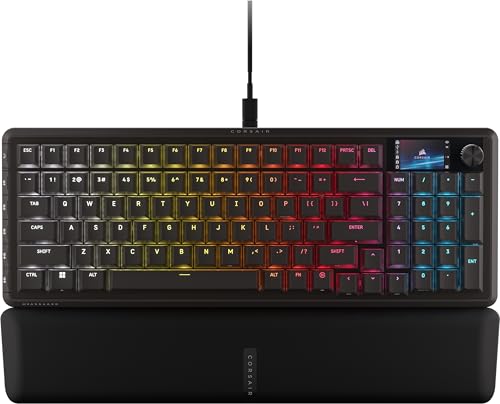
Best Mechanical Keyboard Under $1,500 (2026)
Top pick: CORSAIR VANGUARD 96 Wired Mechanical Gaming Keyboard
Best Mechanical Keyboard Under $2,500 (2026)
Top pick: CORSAIR VANGUARD 96 Wired Mechanical Gaming Keyboard
How to choose a custom keyboard
Custom keyboards in this lineup differ in how much of the board you can change after you buy it. The switch sets how each keypress responds, and some boards let you swap switches or move the actuation point. Layout runs from 75% to 100%, and some boards add dials, screens, or macro keys beside the keys. The three sections below break down actuation, extra controls, and mount style, with the exact figures from the boards in this category.
Actuation depth you can change
Magnetic switches change the decision from picking one actuation depth to setting it per key. The Keychron K2 HE uses Gateron Double-Rail Magnetic switches with actuation adjustable from 0.2 to 3.8 mm at 0.1 mm sensitivity, and the Keychron Q6 HE uses the same switches with rapid trigger, where activation and reset follow key travel. The Keychron K2 HE Rapid Trigger adds snap action, which prioritizes the last key pressed for directional changes. Fixed switches give one depth: the Razer BlackWidow V4 uses Green switches with a 1.9mm actuation point and 50g of force, the GravaStar Mercury K1 uses linear switches at 40gf actuation with 1.5mm pre-travel and 3.5mm total travel, and the Mercury K1 Pro uses Speedy Mint linear switches at 45gf with 1.2mm pre-travel. Buyers who want shallow presses for gaming and deeper presses for typing need the adjustable range from 0.2 to 3.8 mm.
Dials, screens, and macro keys
Extra controls decide how much of your setup the keyboard runs. The Razer BlackWidow V4 Pro pairs a command dial with 8 dedicated macro keys, and the Razer BlackWidow V4 keeps 6 dedicated macro keys. The CORSAIR VANGUARD 96 adds 6 programmable G-keys, a 1.9-inch LCD screen, and virtual Stream Deck shortcuts, while the CORSAIR GALLEON 100 SD RGB adds Stream Deck keys and dials with a full-color 5-inch display. The GravaStar Mercury K98 Pro pairs a 1.65-inch TFT display with a multifunction knob, the ASUS ROG Azoth pairs a 2-inch OLED screen with a multi-function control knob, and the GravaStar Mercury K1 Pro adds a dedicated control knob beside its 79 keys. The ASUS ROG Strix Scope II 96 uses a multi-function wheel with pre-programmed hotkeys F1-F5, and the widest display here measures 5 inches.
Mount style and sound dampening
Mount style and foam decide how each keystroke sounds. The GravaStar Mercury K1 uses a gasket-mounted structure with five layers of sound-dampening foam, and the Mercury K1 Pro pairs a gasket-mounted FR4 plate with a 5-layer foam dampening structure. The GravaStar Mercury K98 Pro uses a 5-layer dampened gasket structure with Poron case foam, an IXPE switch pad, and PET film. The ASUS ROG Azoth uses a silicone gasket mount with three layers of dampening foam, and the Keychron Q6 HE uses a double-gasket design with acoustic foams. The KEEBMONKEY WOBKEY Rainy 75 adds five-layer foam, 14 dampening buds, and FR4 plates with flex cuts, and the Razer BlackWidow V4 75% uses a gasket-mounted FR4 plate with two layers of sound-dampening foam. Layer counts run from two layers on the Razer BlackWidow V4 75% to five layers on the GravaStar boards, and the Rainy 75 counts 14 dampening buds.