Best Workstation Desktop (2026)

We earn a commission when you buy through our links, at no extra cost to you. As an Amazon Associate I earn from qualifying purchases.
Quick answer
Lenovo ThinkStation P2 Gen 2 Workstation Desktop pairs 128GB DDR5 RAM with a 2TB SSD and an Intel Core Ultra 7 265K processor, and it suits engineers and designers running virtual machines, large datasets and memory-hungry applications. The Dell Tower Desktop follows with 16GB DDR5 RAM and a 1TB PCIe NVMe SSD for business work across four FHD monitors, and the HP Z2 SFF G1i adds 32GB DDR5 RAM for CAD and 3D modeling.
Ranked at a glance
| # | Product | Memory | Storage | WiseScore | Link |
|---|---|---|---|---|---|
| 1 | 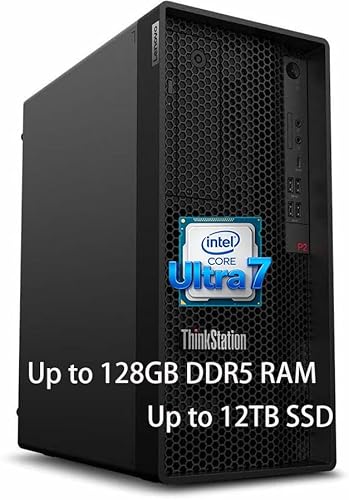 Lenovo ThinkStation P2 Gen 2 Workstation DesktopBest Overall | 128 GB | 2000 GB | 9.4/10 | Check on Amazon → |
| 2 |  Dell Tower DesktopSecond Pick | 16 GB | 1000 GB | 9.3/10 | Check on Amazon → |
| 3 |  Dell Pro Desktop TowerAlso Consider | — | 512 GB | 9.2/10 | Check on Amazon → |
| 4 |  HP Z2 SFF G1i Workstation DesktopAlso Consider | 32 GB | 1000 GB | 9.1/10 | Check on Amazon → |

The lineup, one by one
Lenovo ThinkStation P2 Gen 2 Workstation Desktop
The 128GB DDR5 RAM, 2TB SSD and Intel Core Ultra 7 265K processor suit heavy multitasking with virtual machines and large datasets.
Why #1: Top figure in this lineup for memory (128 GB) and storage (2000 GB). The rest of its WiseScore comes from Amazon sales data.
- Memory
- 128 GB
- Storage
- 2000 GB
- Processor
- Intel Core Ultra 7 265K
- Warranty
- 1 Year
Good fit if
- You run virtual machines and large datasets on 128GB DDR5 RAM
- You need ISV-certified stability for AutoCAD, Revit and SOLIDWORKS
Look elsewhere if
- You need four FHD monitors on DisplayPort daisy chaining
- You need onsite service at your home or office
This ThinkStation pairs 128GB DDR5 RAM with an Intel Core Ultra 7 265K processor rated up to 5.5 GHz with 20 cores and 20 threads. Storage is a 2TB SSD plus a 1TB HDD, described as 3TB of space, and the same machine offers up to 12TB across three 4TB SSDs. ISV certification covers AutoCAD, Revit, SOLIDWORKS and Adobe, and the tool-less design allows service and future expansion. Connectivity includes Ethernet, WiFi 7 and Bluetooth 5, and Windows 11 Pro is pre-installed. The warranty is 1 year from manufacture.
Dell Tower Desktop
The Intel Core Ultra 7-265, 16GB DDR5 RAM and 1TB PCIe NVMe SSD suit business work across four FHD monitors.
Why #2: No single top figure here; its WiseScore comes from its overall specs plus Amazon sales data.
- Memory
- 16 GB
- Storage
- 1000 GB
- Processor
- Intel Core Ultra 7-265
- Warranty
- 1 Year
Good fit if
- You run business apps on 16GB DDR5 RAM
- You connect up to four FHD monitors by DisplayPort
Look elsewhere if
- You need 128GB DDR5 RAM for virtual machines
- You need 32GB DDR5 RAM for CAD work
This Dell Tower runs an Intel Core Ultra 7-265 with 16GB DDR5 RAM and a 1TB PCIe NVMe SSD, with Intel UHD Graphics and Windows 11 Pro. It connects up to four FHD monitors through DisplayPort daisy chaining, or two 4K displays through HDMI 2.1 and DisplayPort. A wired keyboard is included, and the tool-less entry and removable side panel allow quick access to internal components. A hardware TPM security chip, lock slot and padlock loop cover business security. The 1 Year Onsite Service sends Dell to your home or office when a Limited Hardware Warranty issue cannot be resolved remotely.
Dell Pro Desktop Tower
The Intel Core i3-14100 and 512GB PCIe SSD suit daily office workflows in a compact tower.
Why #3: No single top figure here; its WiseScore comes from its overall specs plus Amazon sales data.
- Storage
- 512 GB
- Processor
- Intel Core i3-14100
Good fit if
- You run daily office workflows on Windows 11 Pro
- You fit a tower into a tight desk setup
Look elsewhere if
- You need the 1TB SSD of the Dell Tower
- You need the 14-core Intel Core Ultra 5 235
This Dell Pro Tower runs a 14th Gen Intel Core i3-14100 with a 512GB PCIe SSD and Intel UHD Graphics 730, pre-loaded with Windows 11 Pro. The chassis measures 12.76 inches high by 6.06 inches wide by 11.53 inches deep and weighs 9.17 lbs. DisplayPort 1.4 and HDMI 2.1 outputs drive multiple monitors, with 8 USB ports, Gigabit Ethernet and an audio jack. MediaTek Wi-Fi 6 and Bluetooth cover wireless links, and a metal-reinforced chassis, Kensington lock slot and padlock loop secure the machine in shared spaces. BitLocker data protection and Remote Desktop come with Windows 11 Pro.
HP Z2 SFF G1i Workstation Desktop
The 32GB DDR5 RAM, 1TB PCIe NVMe SSD and Intel Core Ultra 5 235 suit CAD, 3D modeling and simulation in a small form factor.
Why #4: No single top figure here; its WiseScore comes from its overall specs plus Amazon sales data.
- Memory
- 32 GB
- Storage
- 1000 GB
- Processor
- Intel Core Ultra 5 235
Good fit if
- You run CAD and 3D modeling on 32GB DDR5 RAM
- You need 8K display support on DisplayPort 1.4
Look elsewhere if
- You need 128GB DDR5 RAM for virtual machines
- You need four FHD monitors by DisplayPort daisy chaining
This HP Z2 SFF G1i runs an Intel Core Ultra 5 235 processor with 14 cores and 14 threads rated up to 5.0GHz, paired with 32GB DDR5 RAM and a 1TB PCIe NVMe M.2 SSD. The W880 workstation chipset and MIL-STD 810H sit behind ISV certifications for AutoCAD, Creo, SOLIDWORKS, ANSYS and MATLAB. Ports include 2x USB-C 3.2 Gen 2x2, 4x USB-A 3.2 Gen 2, 2x USB-A 3.2 Gen 1, 3x USB-A 2.0, 2x DisplayPort 1.4 and Ethernet, with a single display resolution up to 8K. A full-size USB keyboard and mouse are included, and Windows 11 Pro brings BitLocker and Remote Desktop.
Worth the splurge, and what you can skip
Worth the splurge
- 128GB DDR5 RAM. The Lenovo is the pick with 128GB DDR5 RAM, so choose it when virtual machines, large datasets and memory-hungry applications need that memory.
- A 2TB SSD plus a 1TB HDD. The Lenovo is the pick with a 2TB SSD plus a 1TB HDD, so choose it when your local files need more room than a 1TB drive holds.
Fine to skip
- Up to 12TB of storage. If your files fit within a 1TB drive, the Dell Tower and the HP already cover that requirement with their 1TB PCIe NVMe SSDs, so the Lenovo 12TB option adds capacity you would not use.
- 8K display support. If your monitors are FHD or 4K, the Dell Tower already covers that need with four FHD monitors or two 4K displays, so the HP 8K support adds resolution you would not use.
Deciding factors for desktop computers
Memory for virtual machines and datasets
The Lenovo carries 128GB DDR5 RAM, the HP carries 32GB DDR5 RAM and the Dell Tower carries 16GB DDR5 RAM. Virtual machines and large datasets call for the larger figure, while business apps and daily office work run on the smaller ones. The Lenovo pairs 128GB DDR5 RAM with virtual machines, large datasets and memory-hungry applications, and the HP pairs 32GB DDR5 RAM with multitasking. The Lenovo also pairs its memory with an Intel Core Ultra 7 265K processor rated up to 5.5 GHz with 20 cores and 20 threads, while the HP pairs its memory with an Intel Core Ultra 5 235 rated up to 5.0GHz with 14 cores and 14 threads.
Storage size and drive type
The Lenovo pairs a 2TB SSD with a 1TB HDD, described as 3TB of space, while the Dell Tower and the HP each carry a 1TB PCIe NVMe SSD and the Dell Pro carries a 512GB PCIe SSD. A 1TB drive holds the operating system, applications and a working set of files, while the Lenovo 2TB SSD leaves room for larger local collections. The Lenovo also offers up to 12TB across three 4TB SSDs. Compare the installed drive against the files you keep locally, since cloud storage does not change the installed figure. The HP pairs its 1TB PCIe NVMe M.2 SSD with 32GB DDR5 RAM for fast data access, and the Dell Tower pairs its 1TB PCIe NVMe SSD with 16GB DDR5 RAM.
Processors and monitor support
The Lenovo runs an Intel Core Ultra 7 265K rated up to 5.5 GHz with 20 cores and 20 threads, the HP runs an Intel Core Ultra 5 235 rated up to 5.0GHz with 14 cores and 14 threads, the Dell Tower runs an Intel Core Ultra 7-265, and the Dell Pro runs an Intel Core i3-14100. For monitors, the Dell Tower connects up to four FHD monitors through DisplayPort daisy chaining, or two 4K displays through HDMI 2.1 and DisplayPort. The HP drives a single display up to 8K through DisplayPort 1.4, and the Dell Pro offers DisplayPort 1.4 and HDMI 2.1 outputs. The Dell Pro also carries 8 USB ports.
FAQ about desktop computers
How much RAM do these workstation desktops have?
The Lenovo has 128GB DDR5 RAM, the HP has 32GB DDR5 RAM and the Dell Tower has 16GB DDR5 RAM. Match the memory to virtual machines, large datasets and multitasking, since those jobs call for the larger figures.
What storage comes with each desktop?
The Lenovo pairs a 2TB SSD with a 1TB HDD, described as 3TB of space. The Dell Tower and the HP each carry a 1TB PCIe NVMe SSD, and the Dell Pro carries a 512GB PCIe SSD. Compare the installed drive against the files you keep locally.
Which desktops support more than one monitor?
The Dell Tower connects up to four FHD monitors through DisplayPort daisy chaining, or two 4K displays through HDMI 2.1 and DisplayPort. The HP drives a single display up to 8K through DisplayPort 1.4, and the Dell Pro offers DisplayPort 1.4 and HDMI 2.1 outputs.
Bottom line
Compare before you buy
Side-by-side comparisons that include desktop computers, checked with the same spec data.
Keep comparing
More computers & office guides, ranked with the same WiseScore method.

Written by Nathan Reeve, WiseSplurge editor
Specs come from each maker's Amazon listing and were last checked on November 29, 2026. Each WiseScore (out of 10) blends those specs with Amazon sales data. We compare published figures rather than testing products in person.