Best Monitor with USB C Power Delivery (2026)

We earn a commission when you buy through our links, at no extra cost to you. As an Amazon Associate I earn from qualifying purchases.
Quick answer
The msi PRO MP341CQPHG E12 34" VA 3440x1440 suits multitaskers who want a 34-inch 3440x1440 screen with Type-C 98W Power Delivery and a 120Hz refresh rate. Its single USB-C connection carries video and charging, and its KVM switch shares the screen between sources. The 27-inch Dell S2722DC charges a laptop at 65W, the 4K CUNPU model suits photo and video editing at 27 inches, and the INNOCN model suits video editing at 27 inches.
Ranked at a glance
| # | Product | Screen size | Native refresh rate | WiseScore | Link |
|---|---|---|---|---|---|
| 1 |  msi PRO MP341CQPHG E12 34" VA 3440x1440Best Overall | 34 in | 120 Hz | 9.5/10 | Check on Amazon → |
| 2 |  Dell S2722DC MonitorSecond Pick | 27 in | 75 Hz | 9.4/10 | Check on Amazon → |
| 3 |  msi Modern MD342CQPW 34in VA 3440 xAlso Consider | 34 in | 120 Hz | 9.3/10 | Check on Amazon → |
| 4 | 27 in | 70 Hz | 9.2/10 | Check on Amazon → | |
| 5 |  INNOCN 27" 4K USB C HDR400 MonitorAlso Consider | — | 60 Hz | 9.1/10 | Check on Amazon → |
| 6 |  ASUS VA34VCPSR 34" 1440P Curved MonitorAlso Consider | 34 in | — | 9.0/10 | Check on Amazon → |
| 7 | 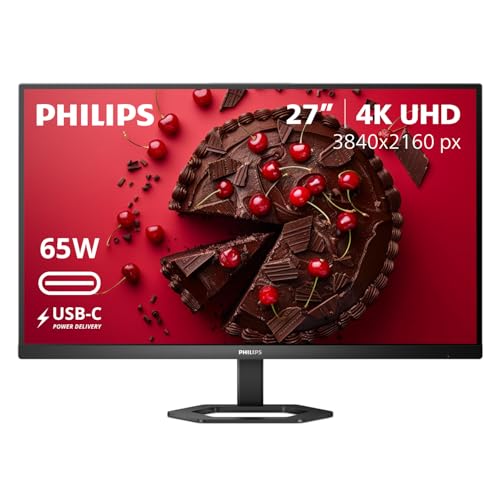 Philips 27" Computer MonitorAlso Consider | 27 in | — | 8.9/10 | Check on Amazon → |
| 8 | — | — | 8.8/10 | Check on Amazon → |

The lineup, one by one
msi PRO MP341CQPHG E12 34" VA 3440x1440
A 34-inch 3440x1440 VA screen, 120Hz refresh rate, and Type-C 98W Power Delivery suit wide multitasking setups.
Why #1: Top figure in this lineup for native refresh rate (120 Hz). The rest of its WiseScore comes from Amazon sales data.
- Screen size
- 34 in
- Native refresh rate
- 120 Hz
- Resolution
- 3440x1440
- Panel type
- VA
- Response time
- 1 ms
- Warranty
- 3 Years
Good fit if
- You want a 34-inch 3440x1440 screen for side-by-side work
- You want 98W USB-C charging through one cable
Look elsewhere if
- You need the 4-year warranty of the Philips monitor
- You need a 27-inch screen for a smaller desk
This monitor has a 34-inch VA panel at 3440x1440, a 120Hz native refresh rate, and a 1 ms response time. Its Type-C connection provides 98W Power Delivery and display, and it has a KVM switch. The 1500R curved screen, height-adjustable stand, VESA mount, and built-in speaker are part of the configuration. Warranty coverage runs 3 Years. The 21:9 UWQHD screen gives room for two windows side by side.
Dell S2722DC Monitor
A 27-inch 2560x1440 screen with 65W USB-C charging and a height, pivot, swivel, and tilt stand suits compact desks.
Why #2: No single top figure here; its WiseScore comes from its overall specs plus Amazon sales data.
- Screen size
- 27 in
- Native refresh rate
- 75 Hz
- Resolution
- 2560x1440
- Response time
- 4 ms
- Warranty
- 3 Years
Good fit if
- You want a 27-inch 2560x1440 screen at 75Hz
- You want 65W USB-C charging for a laptop
Look elsewhere if
- You need 98W USB-C charging for a larger laptop
- You need a 120Hz refresh rate for smoother motion
This Dell monitor has a 27-inch screen at 2560x1440, a 75Hz native refresh rate, and a 4 ms response time. Its USB-C connection provides 65W Power Delivery and carries power, video, audio, and data through one cable. It has a built-in speaker, a quick-access USB 3.2 Gen 1 Type-A port, and AMD FreeSync. Warranty coverage runs 3 Years. The stand adjusts in height, tilt, swivel, and pivot for different viewing positions.
msi Modern MD342CQPW 34in VA 3440 x
A white 34-inch 3440x1440 VA screen with 120Hz refresh rate and 98W USB-C charging suits wide multitasking setups.
Why #3: Top figure in this lineup for native refresh rate (120 Hz). The rest of its WiseScore comes from Amazon sales data.
- Screen size
- 34 in
- Native refresh rate
- 120 Hz
- Resolution
- 3440 x 1440
- Panel type
- VA
- Response time
- 1 ms
- Warranty
- 3 Year
Good fit if
- You want a white 34-inch 3440x1440 screen
- You want 98W USB-C charging through one cable
Look elsewhere if
- You need the 400-nit brightness of the INNOCN
- You need a 27-inch screen for a smaller desk
This msi monitor has a 34-inch VA panel at 3440 x 1440, a 120Hz native refresh rate, and a 1 ms response time. Its USB-C connection provides 98W Power Delivery, and it has a KVM switch. The height-adjustable stand, VESA mount, and speaker are part of the configuration. EyesErgo, Anti-Flicker, and Less Blue Light technologies are part of the design. Warranty coverage runs 3 Year.

CUNPU 27" USBC 4K 70Hz IPS Photo Video Editing Monitor
A 27-inch 4K IPS screen with 65W USB-C charging, 100% DCI-P3, and 1.07 billion colors suits photo and video editing.
Why #4: No single top figure here; its WiseScore comes from its overall specs plus Amazon sales data.
- Screen size
- 27 in
- Native refresh rate
- 70 Hz
- Brightness
- 300 nits
- Resolution
- 4K
- Panel type
- IPS
- Warranty
- 1 Year
Good fit if
- You edit photos and want 100% DCI-P3 color coverage
- You want a 27-inch 4K screen at 70Hz
Look elsewhere if
- You need the 400-nit brightness of the INNOCN
- You need the 120Hz refresh rate of the msi monitors
This CUNPU monitor has a 27-inch IPS panel at 4K, a 70Hz native refresh rate, 300 nits of brightness, and a 1000:1 static contrast ratio. It shows up to 1.07 billion colors at 163 PPI, with a 178-degree viewing angle and a 3-sided ultra-thin bezel. Its USB-C connection provides 65W Power Delivery. It has PIP and PBP, Adaptive Sync, DisplayPort 1.4, HDMI 2.0, and a headphone jack. Warranty coverage runs 1 Year.
INNOCN 27" 4K USB C HDR400 Monitor
A 27-inch 4K IPS screen with 65W USB-C charging, 400 nits, and HDR400 suits video editing.
Why #5: No single top figure here; its WiseScore comes from its overall specs plus Amazon sales data.
- Native refresh rate
- 60 Hz
- Brightness
- 400 nits
- Resolution
- 3840*2160p
- Panel type
- IPS
- Warranty
- 1 Year
Good fit if
- You want 400 nits and HDR400 for video editing
- You want a 27-inch 4K screen at 60Hz
Look elsewhere if
- You need the 120Hz refresh rate of the msi monitors
- You need a 4-year warranty for longer coverage
This INNOCN monitor has a 27-inch IPS panel at 3840x2160p, a 60Hz native refresh rate, 400 nits of brightness, and a 1000:1 contrast ratio. It shows 1.07 billion colors with a 178-degree viewing angle. Its USB-C connection provides 65W of reverse charging to a USB-C laptop. The stand pivots 90 degrees and adjusts in height, and the monitor is VESA wall mountable at 75x75. Warranty coverage runs 1 Year.
ASUS VA34VCPSR 34" 1440P Curved Monitor
A 34-inch 3440x1440 curved screen with 96W USB-C charging, a USB hub, and RJ45 suits a one-cable desk setup.
Why #6: No single top figure here; its WiseScore comes from its overall specs plus Amazon sales data.
- Screen size
- 34 in
- Resolution
- 3440x1440
- Warranty
- 3 Year
Good fit if
- You want RJ45 and a USB hub with 96W USB-C charging
- You want a 34-inch 3440x1440 screen at up to 100Hz
Look elsewhere if
- You need a 27-inch 4K screen for photo editing
- You need a 4-year warranty for longer coverage
This ASUS monitor has a 34-inch WQHD panel at 3440x1440 with 1500R curvature and a 178-degree wide viewing angle. Its USB-C port provides up to 96W Power Delivery and carries data and video through one cable. It has HDMI, DisplayPort, an earphone jack, a USB hub, and an RJ45 LAN port. Eye Care technology uses Flicker-free and Low Blue Light features. The stand adjusts in tilt, swivel, and height, and the monitor is VESA wall mountable. Warranty coverage runs 3 Year with Advanced Replacement and Repair service.
Philips 27" Computer Monitor
A 27-inch 4K IPS screen with 65W USB-C charging, DisplayHDR 400, and a 4-year warranty suits long-term desk use.
Why #7: No single top figure here; its WiseScore comes from its overall specs plus Amazon sales data.
- Screen size
- 27 in
- Resolution
- 3840x2160
- Panel type
- IPS
- Warranty
- 4 year
Good fit if
- You want a 4-year warranty on a 27-inch 4K screen
- You want DisplayHDR 400 with 65W USB-C charging
Look elsewhere if
- You need 98W USB-C charging for a larger laptop
- You need 100% DCI-P3 color coverage for photo work
This Philips monitor has a 27-inch IPS panel at 3840x2160, with DisplayHDR 400 certification. Its USB-C connection provides up to 65W Power Delivery and carries video and data through one cable. It has a USB 3.2 hub, HDMI 2.0, and DisplayPort 1.2. MultiView supports two devices at once. The stand adjusts in height, pivot, and tilt, and the monitor is VESA mount compatible. LowBlue Mode and Flicker-Free technology are part of the design. Warranty coverage runs 4 year.

ASUS BE24ECSBT 24 Inch 1080P Touchscreen Computer Monitor
A 24-inch 1920x1080 IPS touchscreen with a webcam and 80W USB-C charging suits video calls and touch work.
Why #8: No single top figure here; its WiseScore comes from its overall specs plus Amazon sales data.
- Resolution
- 1920 x 1080
- Panel type
- IPS
- Warranty
- 3 Year
Good fit if
- You want 10-point touch on a 24-inch 1920x1080 screen
- You want a built-in webcam and 80W USB-C charging
Look elsewhere if
- You need 96W USB-C charging for a larger laptop
- You need a 27-inch screen for a larger workspace
This ASUS monitor has a 23.8-inch Full HD IPS panel at 1920 x 1080 with 10-point touch capacity. Its USB-C port provides up to 80W Power Delivery and carries data and video through one cable. It has a webcam, HDMI, DisplayPort in and out for daisy-chain, an earphone jack, and a USB hub. The stand adjusts in tilt, swivel, pivot, and height by 130mm, and the monitor is VESA wall mountable. Warranty coverage runs 3 Year with Advanced Replacement and Repair service.
Worth the splurge, and what you can skip
Worth the splurge
- 98W USB-C Power Delivery. The two msi 34-inch monitors provide 98W USB-C Power Delivery, so a buyer whose laptop needs more than the 65W of the Dell, CUNPU, INNOCN, and Philips monitors needs that figure.
- A 34-inch 3440x1440 screen. The msi PRO MP341CQPHG E12, msi Modern MD342CQPW, and ASUS VA34VCPSR have 34-inch 3440x1440 screens, so a buyer who wants that width for side-by-side work needs that figure.
Fine to skip
- A 4K resolution screen. If your work fits a 3440x1440 screen, the msi PRO MP341CQPHG E12 and ASUS VA34VCPSR already cover that requirement with 98W and up to 96W USB-C charging.
- 10-point touch and webcam. A buyer who works with a keyboard and mouse does not need touch input, and the Dell S2722DC and Philips monitors cover desk work with 65W USB-C charging and height adjustment.
Deciding factors for computer monitors
USB-C charging wattage and one-cable setup
The two msi 34-inch monitors provide 98W USB-C Power Delivery, and the ASUS VA34VCPSR provides up to 96W. The ASUS BE24ECSBT provides up to 80W, while the Dell S2722DC, CUNPU, INNOCN, and Philips monitors provide 65W. Each of these connections carries video and charging through one cable, and the Dell connection also carries audio and data. The ASUS VA34VCPSR adds a USB hub and RJ45, and the Philips monitor adds a USB 3.2 hub. Match the wattage figure to the charging figure your laptop needs, and keep 98W at the top of that comparison. The msi monitors and the ASUS VA34VCPSR sit above 90W, while the other five monitors sit at 80W or 65W.
Screen size, resolution, and refresh rate
The msi PRO MP341CQPHG E12, msi Modern MD342CQPW, and ASUS VA34VCPSR have 34-inch screens at 3440x1440. The Dell S2722DC has a 27-inch screen at 2560x1440, the CUNPU, INNOCN, and Philips monitors have 27-inch screens at 4K, and the ASUS BE24ECSBT has a 23.8-inch screen at 1920 x 1080. Refresh rates run 120Hz on the two msi monitors, up to 100Hz on the ASUS VA34VCPSR, 75Hz on the Dell, 70Hz on the CUNPU, and 60Hz on the INNOCN. Screen size and resolution describe different figures, so compare 3440x1440 against 3840x2160. Response times run 1 ms on the two msi monitors and 4 ms on the Dell monitor.
Panel type, color, and warranty
The two msi monitors use VA panels, and the CUNPU, INNOCN, Philips, and ASUS BE24ECSBT monitors use IPS panels. The CUNPU monitor has 100% DCI-P3 color coverage, 1.07 billion colors, and a 300-nit brightness figure. The INNOCN monitor has 400 nits, HDR400, and 1.07 billion colors, and the Philips monitor has DisplayHDR 400. Warranty coverage runs 4 year on the Philips monitor, 3 Years on the msi PRO MP341CQPHG E12 and Dell S2722DC, and 1 Year on the CUNPU and INNOCN monitors. The ASUS VA34VCPSR and ASUS BE24ECSBT warranties include Advanced Replacement and Repair service. The INNOCN monitor has TUV Low Blue Light features, and the Philips monitor has LowBlue Mode, Flicker-Free technology, and DisplayHDR 400.
FAQ about computer monitors
How much USB-C charging do these monitors provide?
The two msi 34-inch monitors provide 98W USB-C Power Delivery. The ASUS VA34VCPSR provides up to 96W, the ASUS BE24ECSBT provides up to 80W, and the Dell, CUNPU, INNOCN, and Philips monitors provide 65W. All eight monitors charge through USB-C.
Which monitors here have a 4K screen?
The CUNPU, INNOCN, and Philips monitors have 27-inch 4K screens at 3840x2160. The msi and ASUS 34-inch monitors have 3440x1440 screens, the Dell has a 2560x1440 screen, and the ASUS BE24ECSBT has a 1920 x 1080 screen.
How long is the warranty on these monitors?
The Philips monitor has a 4 year warranty. The msi, Dell, and ASUS monitors have 3 Year warranties, and the CUNPU and INNOCN monitors have 1 Year warranties. The ASUS warranties include Advanced Replacement and Repair service.
Bottom line
Keep comparing
More computers & office guides, ranked with the same WiseScore method.

Written by Nathan Reeve, WiseSplurge editor
Specs come from each maker's Amazon listing and were last checked on November 29, 2026. Each WiseScore (out of 10) blends those specs with Amazon sales data. We compare published figures rather than testing products in person.