Best Computer Monitor for Low Vision (2026)

We earn a commission when you buy through our links, at no extra cost to you. As an Amazon Associate I earn from qualifying purchases.
Quick answer
Choose the Z-Edge 27 inch Curved Gaming Monitor if you want a 27-inch curved screen at 180 Hz with low blue light for long hours at the desk. Its 1500R curve and 3000:1 contrast ratio set it apart, while the Samsung 32-inch monitor adds vision accessibility tools with screen magnification. The Lenovo 22-inch and 24-inch monitors add IPS panels with anti-glare screens.
Ranked at a glance
| # | Product | Screen size | Native refresh rate | WiseScore | Link |
|---|---|---|---|---|---|
| 1 |  Z-Edge 27 inch Curved Gaming MonitorBest Overall | 27 in | 180 Hz | 9.6/10 | Check on Amazon → |
| 2 | 22 in | — | 9.3/10 | Check on Amazon → | |
| 3 |  Samsung 32" M5 Series FHD Smart MonitorAlso Consider | 32 in | 60 Hz | 9.1/10 | Check on Amazon → |
| 4 | 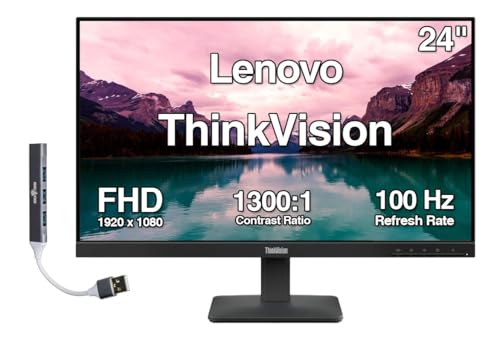 Lenovo ThinkVision 24" FHD IPS MonitorAlso Consider | — | — | 9.0/10 | Check on Amazon → |

The lineup, one by one
Z-Edge 27 inch Curved Gaming Monitor
A 27-inch 1500R curved monitor with a 180 Hz refresh rate, 1 ms response time, and low blue light.
Why #1: No single top figure here; its WiseScore comes from its overall specs plus Amazon sales data.
- Screen size
- 27 in
- Native refresh rate
- 180 Hz
- Resolution
- 1080P
- Response time
- 1 ms
- Warranty
- 1 Year
Good fit if
- You want a 27-inch curved screen for office and games
- You want a 180 Hz refresh rate with 1 ms response
Look elsewhere if
- You need a 32 inch screen like the Samsung
- You need a built-in webcam like the Lenovo 22 inch
The Z-Edge 27 inch monitor pairs a 1500R curved screen with a 1080P display and a 3000:1 contrast ratio for deep blacks and bright whites. Its 180 Hz refresh rate runs through the DP port with a 1 ms response time and FreeSync, and flicker-free operation pairs with low blue light. One DP port and one HDMI port connect devices, and both ports support up to 180 Hz. The three-sided edge-to-edge design suits a dual-monitor setup, and the 100 x 100 mm VESA mount fits a wall or a mounting arm with the metal stand. It carries a 1-year warranty.

Lenovo ThinkVision 22" FHD IPS Conferencing Monitor
A 22-inch IPS conferencing monitor with a built-in webcam, adjustable height, and 250 nits brightness.
Why #2: No single top figure here; its WiseScore comes from its overall specs plus Amazon sales data.
- Screen size
- 22 in
- Brightness
- 250 nits
- Resolution
- 1920x1080
- Panel type
- IPS
- Response time
- 4 ms
Good fit if
- You want a built-in webcam with dual microphones
- You want height, tilt, swivel and pivot adjustment
Look elsewhere if
- You need a 32 inch screen like the Samsung
- You need a 180 Hz refresh rate like the Z-Edge
The Lenovo ThinkVision 22 inch monitor pairs a 22-inch IPS FHD display at 1920 x 1080 with 250 nits brightness, anti-glare and low blue light. Height, tilt, swivel and pivot adjust the screen, and the 100 x 100 mm VESA mount fits a wall or a multi-monitor stand. One HDMI port, one DisplayPort, one USB-A port and one USB-B port connect notebooks, towers and peripherals, and a Dockztorm USB port expander comes in the box. The 178-degree viewing angles keep the screen clear from almost any position.
Samsung 32" M5 Series FHD Smart Monitor
A 32-inch FHD smart monitor with vision accessibility tools, HDR10, speakers, and a 60 Hz refresh rate.
Why #3: Top figure in this lineup for screen size (32 in). The rest of its WiseScore comes from Amazon sales data.
- Screen size
- 32 in
- Native refresh rate
- 60 Hz
- Resolution
- FHD
- Response time
- 4 ms
Good fit if
- You want screen magnification and color switching tools
- You want a 32 inch screen with streaming TV built in
Look elsewhere if
- You need a 180 Hz refresh rate like the Z-Edge
- You need a built-in webcam like the Lenovo 22 inch
The Samsung 32 inch monitor is the pick with vision accessibility tools for low vision users, with screen magnification, color switching and audio descriptions for TV settings. Its FHD display runs at 60 Hz with a 4 ms response time, HDR10 and built-in speakers, and the Streaming TV and Gaming Hub run without a PC or console. Microsoft 365 apps run on the monitor, and one mouse and keyboard control multiple devices.
Lenovo ThinkVision 24" FHD IPS Monitor
A 24-inch IPS monitor with a 100 Hz refresh rate, 99% sRGB color, and flicker-free low blue light.
Why #4: No single top figure here; its WiseScore comes from its overall specs plus Amazon sales data.
- Resolution
- 1920 x 1080
- Panel type
- IPS
- Response time
- 4 ms
Good fit if
- You want a 100 Hz refresh rate on an IPS panel
- You want 99% sRGB color with 16.7 million colors
Look elsewhere if
- You need a 27 inch curved screen like the Z-Edge
- You need vision accessibility tools like the Samsung
The Lenovo ThinkVision 24 inch monitor pairs a 23.8-inch IPS Full HD display at 1920 x 1080 with a 100 Hz refresh rate and a 4 ms response time in Extreme Mode. Its 99% sRGB color gamut covers 16.7 million colors with a 1300:1 contrast ratio, and the 250-nit brightness pairs with an anti-glare screen. Low blue light and flicker-free technology run without changing color accuracy, and the 178-degree viewing angles keep the screen clear from the side. HDMI 1.4 and VGA ports connect devices, the tilt stand adjusts, and the 100 x 100 mm VESA mount fits a wall or an arm. A Dockztorm data hub comes in the box with SuperSpeed USB transfer up to 5 Gbps.
Worth the splurge, and what you can skip
Worth the splurge
- A 32-inch screen. The Samsung is the pick with the 32-inch screen, so choose it when you want a 32-inch screen with vision accessibility tools.
- A 180 Hz refresh rate. The Z-Edge is the pick with the 180 Hz refresh rate, so choose it when fast motion on screen needs that stated rate.
Fine to skip
- A built-in webcam. If you never use a camera, the Z-Edge and the Samsung already cover that need with their screens, so the Lenovo 22 inch webcam adds a camera you would not use.
- Gaming Hub and streaming TV. If you use the monitor only with a computer, the Z-Edge and both Lenovo monitors already cover that need with their HDMI connections, so the Samsung Gaming Hub adds apps you would not use.
Deciding factors for computer monitors
Screen size and resolution
Screens run 22 inches on the Lenovo ThinkVision 22, 24 inches on the Lenovo ThinkVision 24, 27 inches on the Z-Edge and 32 inches on the Samsung. Resolution runs 1920 x 1080 on both Lenovo monitors and 1080P on the Z-Edge and the Samsung, so all four show Full HD. The Samsung adds a 32-inch screen with streaming TV built in, while the Z-Edge adds a 1500R curve at 27 inches. The Lenovo 22 inch monitor pairs its 22-inch screen with a built-in webcam, dual-array microphones and a 2W stereo speaker system for video calls. Contrast runs 3000:1 on the Z-Edge and 1300:1 on the Lenovo 24 inch monitor.
Refresh rate and response time
Refresh rates run 60 Hz on the Samsung, 100 Hz on the Lenovo 24 inch monitor and 180 Hz on the Z-Edge. Response times run 1 ms on the Z-Edge and 4 ms on the Lenovo 22, the Samsung and the Lenovo 24 inch monitor, with the Lenovo 24 inch figure given in Extreme Mode. The Z-Edge pairs its 180 Hz rate with FreeSync, and the Samsung pairs its 60 Hz rate with HDR10 and streaming TV. A faster stated rate suits fast motion on screen, and the Z-Edge rate is stated at 180 Hz through the DP port connection.
Low blue light, glare and comfort
Low blue light appears on the Z-Edge, the Lenovo 22 inch monitor and the Lenovo 24 inch monitor, while the Samsung pairs its screen with vision accessibility tools. Anti-glare screens appear on both Lenovo monitors, and flicker-free operation appears on the Z-Edge and the Lenovo 24 inch monitor. The Lenovo 22 inch monitor adjusts height, tilt, swivel and pivot, and the Lenovo 24 inch monitor adjusts tilt, while the Z-Edge mounts on a 100 x 100 mm VESA mount. The Samsung vision tools add screen magnification, color switching and audio descriptions. The Lenovo 22 inch monitor also gives 178-degree viewing angles, and the Lenovo 24 inch monitor gives the same 178-degree viewing angles.
FAQ about computer monitors
Which monitor is made for low vision users?
The Samsung 32 inch monitor is the one with vision accessibility tools for low vision users, with screen magnification, color switching and audio descriptions for TV settings. The other three monitors state low blue light and anti-glare or flicker-free features instead.
Which monitors have a 100 Hz refresh rate or higher?
The Z-Edge runs at 180 Hz and the Lenovo 24 inch monitor runs at 100 Hz. The Samsung runs at 60 Hz, and the Lenovo 22 inch monitor pairs its display with a 4 ms response time.
Do these monitors mount on a wall?
Three of the four mount on a wall: the Z-Edge, the Lenovo 22 inch monitor and the Lenovo 24 inch monitor each fit a 100 x 100 mm VESA mount for a wall or a mounting arm. The Samsung 32 inch monitor measures 32 inches.
Bottom line
Keep comparing
More computers & office guides, ranked with the same WiseScore method.

Written by Nathan Reeve, WiseSplurge editor
Specs come from each maker's Amazon listing and were last checked on November 29, 2026. Each WiseScore (out of 10) blends those specs with Amazon sales data. We compare published figures rather than testing products in person.