Best Business Desktop (2026)

We earn a commission when you buy through our links, at no extra cost to you. As an Amazon Associate I earn from qualifying purchases.
Quick answer
Choose the HP Business Tower Desktop PC if you want 32GB of RAM with a 1TB SSD for office multitasking and data processing. Its Intel Core i5 processor and Windows 11 with Copilot AI cover spreadsheets, video meetings and daily workflows. The other three desktops trade memory, storage, processor and ports against that 32GB and 1TB combination.
Ranked at a glance
| # | Product | Memory | Storage | WiseScore | Link |
|---|---|---|---|---|---|
| 1 | 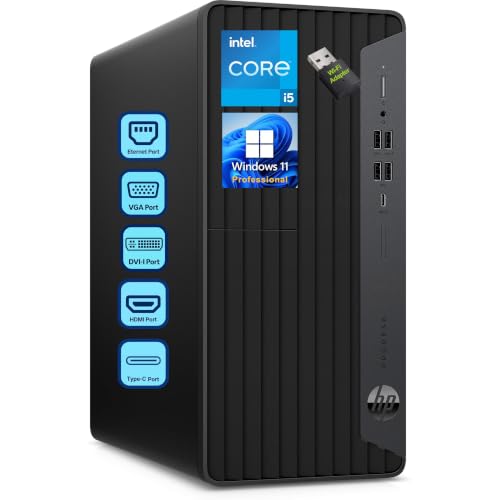 HP Business Tower Desktop PCBest Overall | 32 GB | 1000 GB | 9.6/10 | Check on Amazon → |
| 2 |  Dell Pro Desktop TowerSecond Pick | 16 GB | 512 GB | 9.5/10 | Check on Amazon → |
| 3 |  HP ProDesk SFF Business Desktop ComputerAlso Consider | 8 GB | 512 GB | 9.3/10 | Check on Amazon → |
| 4 |  Lenovo IdeaCentre Secure & Productive Business TowerAlso Consider | 16 GB | 756 GB | 9.2/10 | Check on Amazon → |

The lineup, one by one
HP Business Tower Desktop PC
A tower with an i5 processor, 32GB RAM and a 1TB SSD suits office multitasking and data processing.
Why #1: Top figure in this lineup for memory (32 GB) and storage (1000 GB). The rest of its WiseScore comes from Amazon sales data.
- Memory
- 32 GB
- Storage
- 1000 GB
Good fit if
- You want 32GB of RAM with a 1TB SSD
- You want Windows 11 with Copilot AI
Look elsewhere if
- You need Windows 11 Pro like the Dell Pro Desktop
- You need a 14th Gen processor like the Dell Pro Desktop
This HP Business Tower Desktop PC uses an Intel Core i5 processor with 32GB of RAM and a 1TB SSD for office multitasking. Upgraded memory supports multiple applications and browser tabs, while the SSD gives responsive access to Windows, business software, documents, spreadsheets, presentations and project files. Windows 11 Home gives a familiar workspace, with Copilot AI access for researching information, organizing ideas, drafting content and handling routine tasks. Gigabit Ethernet gives stable wired networking, while the included USB WiFi adapter adds wireless access. Four front USB 3.2 Gen 2 Type-A ports and four rear USB Type-A ports connect storage devices, printers and keyboards. The black tower measures 13.2 by 11.9 by 6.1 inches and weighs 9.26 lb, with an English keyboard and mouse included, a security lock slot and a 180W power supply.
Dell Pro Desktop Tower
A compact tower with a 14th Gen i3, 16GB DDR5 and Windows 11 Pro suits secure office work.
Why #2: No single top figure here; its WiseScore comes from its overall specs plus Amazon sales data.
- Memory
- 16 GB
- Storage
- 512 GB
- Processor
- Intel Core i3-14100
Good fit if
- You want a 14th Gen i3 with 16GB DDR5 RAM
- You want Windows 11 Pro with BitLocker protection
Look elsewhere if
- You need 32GB of RAM like the HP Business Tower
- You need a 1TB SSD like the HP Business Tower
This Dell Pro Desktop Tower uses a 14th Gen Intel Core i3-14100 processor with 16GB of DDR5 RAM and a 512GB PCIe SSD. Windows 11 Pro is pre-loaded, with BitLocker data protection and Remote Desktop access for business use. Intel UHD Graphics 730 gives clear visuals for daily operation. The space-saving chassis measures 12.76 inches high by 6.06 inches wide by 11.53 inches deep and weighs 9.17 lb, fitting tight desk setups with no assembly needed. DisplayPort 1.4 and HDMI 2.1 outputs drive multiple monitors, with 8 USB ports, Gigabit Ethernet and an audio jack. MediaTek Wi-Fi 6 and Bluetooth give wireless networking and peripheral connectivity. A metal-reinforced chassis, Kensington lock slot, padlock loop and media card reader complete the tower. Copilot AI is included.
HP ProDesk SFF Business Desktop Computer
A compact SFF desktop with a Celeron processor and dual 4K support suits small desks and dual monitors.
Why #3: No single top figure here; its WiseScore comes from its overall specs plus Amazon sales data.
- Memory
- 8 GB
- Storage
- 512 GB
- Processor
- Intel Celeron G6900
- Warranty
- 1 Year
Good fit if
- You want a compact SFF desktop for a small desk
- You want dual 4K display support with Windows 11 Pro
Look elsewhere if
- You need the 32GB RAM of the HP Business Tower
- You need a 14th Gen i3-14100 processor
This HP ProDesk SFF Business Desktop Computer uses an Intel Celeron G6900 processor running up to 3.4GHz, with 8GB of RAM and a 512GB SSD in the selected configuration. Integrated Intel UHD Graphics gives clear visuals for presentations, video streaming and everyday display needs. Connectivity includes USB Type-C, multiple USB Type-A ports, HDMI 1.4, DisplayPort 1.4, Gigabit Ethernet and audio connections. HDMI and DisplayPort outputs support dual-display setups, with dual 4K display support for multitasking. The Small Form Factor chassis saves desk space in offices, classrooms and home offices. Memory is available up to 64GB of DDR4 RAM, and storage up to 2TB as a PCIe NVMe SSD. Windows 11 Pro is pre-installed, with an English keyboard and mouse included. Warranty is a 1 Year Warranty.
Lenovo IdeaCentre Secure & Productive Business Tower
A tower with a 4.4GHz Turbo i3, 16GB DDR5 and 756GB storage suits office work and meetings.
Why #4: No single top figure here; its WiseScore comes from its overall specs plus Amazon sales data.
- Memory
- 16 GB
- Storage
- 756 GB
- Processor
- Intel Core i3-13100
Good fit if
- You want 16GB DDR5 with 756GB of storage
- You want Wi-Fi 6E with Bluetooth 5.2
Look elsewhere if
- You need 32GB RAM from the HP Business Tower
- You need a 1TB SSD from the HP Business Tower
This Lenovo IdeaCentre Business Tower uses an Intel Core i3-13100 processor, a 4-core design with 4.4GHz Turbo Boost. Memory is 16GB of DDR5 RAM, and storage is 756GB as a 256GB SSD plus a 500GB HDD. DDR5 memory and PCIe NVMe solid-state storage give quick boot times, smooth app switching and fast access to large files. Built-in Wi-Fi 6E, Gigabit Ethernet and Bluetooth 5.2 give wireless speeds, reliable wired networking and easy pairing with peripherals. Front USB-C and USB-A 3.2 ports, multiple rear USB-A ports, HDMI 2.1, RJ-45 Ethernet and audio jacks support monitor connections. Windows 11 Pro gives a professional experience for everyday work, video meetings and web-based tools. The tower is designed for home, office and school use.
Worth the splurge, and what you can skip
Worth the splurge
- 32GB of RAM. The HP Business Tower is the pick with 32GB of RAM, so choose it when you want that memory figure in this guide.
- Dual 4K display support. The HP ProDesk is the pick with dual 4K display support, so choose it when you want two 4K displays from one desktop.
Fine to skip
- A 1TB SSD. If 512GB covers your files, the Dell Pro gives 512GB with 16GB of DDR5 RAM.
- Wi-Fi 6E. If WiFi 6 covers your network, the Dell Pro gives MediaTek Wi-Fi 6 with Bluetooth.
Deciding factors for desktop computers
Memory and storage
Memory runs from 8GB to 32GB across these desktops. The HP Business Tower gives 32GB of RAM, the Dell Pro and the Lenovo IdeaCentre each give 16GB, and the HP ProDesk gives 8GB. The Dell and Lenovo memory is DDR5, while the ProDesk memory is DDR4 with up to 64GB available. Storage runs from 512GB to 1TB in the selected configurations: the HP Business Tower gives a 1TB SSD, the Lenovo gives 756GB of storage as a 256GB SSD plus a 500GB HDD, and the Dell Pro and HP ProDesk each give a 512GB SSD. The ProDesk storage is available up to 2TB as a PCIe NVMe SSD.
Processor and operating system
Processors differ by model and generation. The HP Business Tower uses an Intel Core i5 processor for office applications, spreadsheets, data entry, web-based tools and video meetings. The Dell Pro uses a 14th Gen Intel Core i3-14100 processor with 16GB of DDR5 RAM and a 512GB PCIe SSD. The HP ProDesk uses an Intel Celeron G6900 processor running up to 3.4GHz, with integrated Intel UHD Graphics. The Lenovo IdeaCentre uses an Intel Core i3-13100 processor, a 4-core design with 4.4GHz Turbo Boost. Operating systems differ too: the HP Business Tower runs Windows 11 Home, while the Dell Pro, HP ProDesk and Lenovo IdeaCentre each run Windows 11 Pro. Copilot AI appears on the HP Business Tower and the Dell Pro.
Ports, wireless and security
Ports and wireless differ across the four desktops. The HP Business Tower gives four front USB 3.2 Gen 2 Type-A ports and four rear USB Type-A ports, with Gigabit Ethernet and an included USB WiFi adapter. The Dell Pro gives DisplayPort 1.4 and HDMI 2.1 outputs, 8 USB ports, Gigabit Ethernet, an audio jack, MediaTek Wi-Fi 6 and Bluetooth. The HP ProDesk gives USB Type-C, multiple USB Type-A ports, HDMI 1.4, DisplayPort 1.4, Gigabit Ethernet and audio connections, with dual 4K display support. The Lenovo gives front USB-C and USB-A 3.2 ports, multiple rear USB-A ports, HDMI 2.1, RJ-45 Ethernet and audio jacks, with Wi-Fi 6E and Bluetooth 5.2.
FAQ about desktop computers
How much memory and storage do these desktops have?
The HP Business Tower gives 32GB of RAM with a 1TB SSD. The Dell Pro and the Lenovo IdeaCentre each give 16GB of RAM, with 512GB of storage on the Dell and 756GB on the Lenovo. The HP ProDesk gives 8GB of RAM with 512GB of storage, with up to 64GB of RAM and up to 2TB of storage available.
Which processors do these desktops use?
The HP Business Tower uses an Intel Core i5 processor. The Dell Pro uses a 14th Gen Intel Core i3-14100 processor. The HP ProDesk uses an Intel Celeron G6900 processor running up to 3.4GHz. The Lenovo IdeaCentre uses an Intel Core i3-13100 processor with 4.4GHz Turbo Boost.
Which desktops run Windows 11 Pro?
The Dell Pro, the HP ProDesk and the Lenovo IdeaCentre each run Windows 11 Pro. The HP Business Tower runs Windows 11 Home, with Copilot AI access for productivity features. Windows 11 Pro on the Dell adds BitLocker data protection and Remote Desktop access for business use.
Bottom line
Compare before you buy
Side-by-side comparisons that include desktop computers, checked with the same spec data.
Keep comparing
More computers & office guides, ranked with the same WiseScore method.

Written by Nathan Reeve, WiseSplurge editor
Specs come from each maker's Amazon listing and were last checked on November 29, 2026. Each WiseScore (out of 10) blends those specs with Amazon sales data. We compare published figures rather than testing products in person.