Best B650e Motherboard (2026)

We earn a commission when you buy through our links, at no extra cost to you. As an Amazon Associate I earn from qualifying purchases.
Quick answer
The ASUS TUF GAMING B650E-E WIFI AMD AM5 B650 ATX motherboard suits builders who want 8+2+1 80A DrMOS power stages and a PCIe 5.0 M.2 slot on an AM5 board. Its three M.2 slots, Wi-Fi 6E and 2.5Gb LAN cover storage, wireless and wired networking in one board. The ASUS B650E MAX Gaming WiFi W matches it on a white PCB, while the MSI B650E GAMING WIFI adds DDR5 up to 8000+ MT/s.
Ranked at a glance
| # | Product | Memory slots | USB ports | WiseScore | Link |
|---|---|---|---|---|---|
| 1 | — | — | 9.2/10 | Check on Amazon → | |
| 2 |  ASUS B650E MAX Gaming WiFi W AMDSecond Pick | — | — | 9.1/10 | Check on Amazon → |
| 3 |  NZXT N7 B650EAlso Consider | — | — | 8.9/10 | Check on Amazon → |
| 4 |  MSI B650E GAMING WIFI MotherboardAlso Consider | — | — | 8.8/10 | Check on Amazon → |
The lineup, one by one
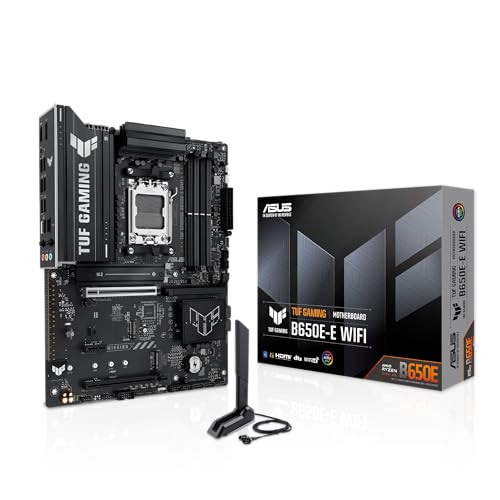
ASUS TUF GAMING B650E-E WIFI AMD AM5 B650 ATX motherboard
8+2+1 80A DrMOS stages, three M.2 slots, Wi-Fi 6E and a 3-year warranty define this TUF AM5 board.
Why #1: No single top figure here; its WiseScore comes from its overall specs plus Amazon sales data.
- CPU socket
- AM5
- Wi-Fi or app control
- Yes
- Warranty
- 3 year
Good fit if
- You want 8+2+1 80A DrMOS stages for Ryzen 9000
- You want a front USB 20Gbps Type-C connector
Look elsewhere if
- You need a white PCB like the ASUS B650E MAX
- You need DDR5 up to 8000+ MT/s like the MSI
The ASUS TUF GAMING B650E-E WIFI AMD AM5 B650 ATX motherboard takes AMD Ryzen 9000, 8000 and 7000 series desktop processors on the AM5 socket. Its 8+2+1 80A DrMOS power stages sit on an 8-layer PCB with 8+4 pin ProCool power connectors. Storage covers one PCIe 5.0 M.2 slot and two PCIe 4.0 M.2 slots, with a PCIe 5.0 x16 slot for graphics. Connectivity includes Wi-Fi 6E, Realtek 2.5Gb Ethernet, a front USB 20Gbps Type-C connector and a rear USB 10Gbps Type-C port. Cooling uses an enlarged VRM heatsink, a flexible M.2 heatsink and a PCH heatsink. DIY features include PCIe Slot Q-Release, M.2 Q-Latch, Q-Antenna, Q-LED, BIOS FlashBack and a pre-mounted I/O shield. A 3-year warranty covers the board.
ASUS B650E MAX Gaming WiFi W AMD
A white PCB, three M.2 slots and Wi-Fi 6E define this ASUS AM5 board with a 3-year warranty.
Why #2: No single top figure here; its WiseScore comes from its overall specs plus Amazon sales data.
- CPU socket
- AM5
- Wi-Fi or app control
- Yes
- Warranty
- 3 Years
Good fit if
- You want a white PCB for a white build
- You want three M.2 slots with PCIe 5.0
Look elsewhere if
- You need 8+2+1 80A DrMOS stages like the TUF
- You need a front USB 20Gbps Type-C connector
The ASUS B650E MAX Gaming WiFi W takes AMD Ryzen 9000, 8000 and 7000 series desktop processors on the AM5 socket. Its 8+2+1 phase power design sits on a 6-layer PCB with alloy chokes and durable capacitors. Storage covers three M.2 slots with a PCIe 5.0 M.2 slot, and a PCIe 5.0 x16 slot takes the graphics card. Connectivity includes Wi-Fi 6E, Realtek 2.5Gb Ethernet, rear USB 10Gbps Type-A and Type-C ports and front USB 5Gbps Type-C support. Cooling uses VRM and M.2 heatsinks, a PCH heatsink and Fan Xpert 2+. DIY features include a pre-mounted I/O shield, BIOS FlashBack, Q-Antenna and Q-LED Core. Three Addressable RGB Gen 2 headers work with Aura Sync, and a 3-year warranty covers the board.
NZXT N7 B650E
A white metal cover, six RGB channels and Wi-Fi 6E define this NZXT AM5 board.
Why #3: No single top figure here; its WiseScore comes from its overall specs plus Amazon sales data.
- CPU socket
- AM5
- Wi-Fi or app control
- Yes
- Warranty
- 3 Years
Good fit if
- You want a white metal cover for your case
- You want six RGB lighting channels through NZXT CAM
Look elsewhere if
- You need three M.2 slots like the TUF board
- You need a 2.5Gb Ethernet port like the TUF
The NZXT N7 B650E takes AMD Ryzen 9000, 8000 and 7000 series processors on the AM5 socket. A white or black metal cover conceals the inner workings and blends with the case, while expanded heat fins cool the PCIe Gen 5 NVMe drive slot. Lighting and cooling modes run through NZXT CAM with six RGB lighting channels, and the board configures lights and fans from any manufacturer. Integrated Wi-Fi 6E and a rear I/O shield keep the build simple, with room on board for upgrades. The board supports DDR5 memory and a 3-year warranty covers it.
MSI B650E GAMING WIFI Motherboard
DDR5 up to 8000+ MT/s, a PCIe 5.0 x16 slot and Wi-Fi 6E define this MSI AM5 board.
Why #4: No single top figure here; its WiseScore comes from its overall specs plus Amazon sales data.
- CPU socket
- AM5
- Wi-Fi or app control
- Yes
- Warranty
- 3 Years
Good fit if
- You want DDR5 up to 8000+ MT/s overclocking
- You want a 12 Duet Rail Power System VRM
Look elsewhere if
- You need three M.2 slots like the TUF board
- You need a white PCB like the ASUS B650E MAX
The MSI B650E GAMING WIFI Motherboard takes AMD Ryzen 9000, 8000 and 7000 series processors on the AM5 socket. Four DDR5 DIMM slots enable memory overclocking up to 8000+ MT/s, and one PCIe 5.0 x16 slot with Steel Armor runs at 128GB/s. A 12 Duet Rail Power System VRM with Core Boost architecture powers the board, with 7W/mK MOSFET thermal pads, an extended heatsink and an EZ M.2 Shield Frozr II. Connectivity includes Wi-Fi 6E with Bluetooth 5.3, 2.5Gbps LAN, a rear USB 10G Type-C port and 7.1 HD Audio with Audio Boost. M.2 Gen5 storage and a 3-year warranty complete the board.
Worth the splurge, and what you can skip
Worth the splurge
- 8+2+1 80A DrMOS stages. The TUF board is the pick with 8+2+1 80A DrMOS stages on an 8-layer PCB, so choose it when your build needs that power design.
- DDR5 up to 8000+ MT/s. The MSI board is the pick with DDR5 up to 8000+ MT/s, so choose it when your memory overclocking needs that speed figure.
Fine to skip
- A white PCB. If your case hides the board, the TUF board already covers AM5, Wi-Fi 6E and three M.2 slots in black, so the white PCB adds a look you would not use.
- Six RGB lighting channels. If you run your lights from the board headers, the TUF and MAX boards each give three Addressable RGB Gen 2 headers with Aura Sync, so the six NZXT CAM channels add control you would not use.
Deciding factors for motherboards
Power stages and PCB layers
Power delivery differs across these four boards. The TUF board uses 8+2+1 80A DrMOS power stages on an 8-layer PCB with 8+4 pin ProCool power connectors, alloy chokes and durable capacitors. The MAX board uses an 8+2+1 phase power design on a 6-layer PCB with alloy chokes and durable capacitors. The MSI board uses a 12 Duet Rail Power System VRM with Core Boost architecture. All four boards take AMD Ryzen 9000, 8000 and 7000 series processors on the AM5 socket, so the power designs serve the same processor range. The TUF board pairs its 80A stages with the 8-layer PCB, while the MAX board pairs its phase design with the 6-layer PCB.
M.2 slots and PCIe 5.0
Storage and graphics lanes differ by slot count and generation. The TUF board gives one PCIe 5.0 M.2 slot and two PCIe 4.0 M.2 slots, three in total, with a PCIe 5.0 x16 slot for graphics. The MAX board gives three M.2 slots with a PCIe 5.0 M.2 slot and a PCIe 5.0 x16 slot. The NZXT board gives a PCIe Gen 5 NVMe drive slot under expanded heat fins. The MSI board gives M.2 Gen5 storage with one PCIe 5.0 x16 slot at 128GB/s. The TUF and MAX boards each give three M.2 slots, while the MSI board pairs its Gen5 M.2 with the x16 slot at 128GB/s.
Connectivity, cooling and DIY features
Connectivity is shared on Wi-Fi 6E across all four boards, while wired networking and USB speeds differ. The TUF and MAX boards each carry Realtek 2.5Gb Ethernet, and the MSI board carries 2.5Gbps LAN with Bluetooth 5.3. The TUF board gives a front USB 20Gbps Type-C connector and a rear USB 10Gbps Type-C port, while the MAX board gives rear USB 10Gbps Type-A and Type-C ports with front USB 5Gbps Type-C support. The MSI board gives a rear USB 10G Type-C port. Cooling runs from the TUF enlarged VRM heatsink to the NZXT expanded heat fins on the Gen 5 NVMe slot. DIY help runs from the TUF PCIe Slot Q-Release to the MAX Q-LED Core, and the MSI board adds MOSFET thermal pads at 7W/mK.
FAQ about motherboards
Which boards have three M.2 slots?
The ASUS TUF GAMING B650E-E WIFI and the ASUS B650E MAX Gaming WiFi W each have three M.2 slots. The TUF board gives one PCIe 5.0 M.2 slot and two PCIe 4.0 M.2 slots, while the MAX board gives a PCIe 5.0 M.2 slot among its three.
Which board states a DDR5 memory speed figure?
The MSI B650E GAMING WIFI supports DDR5 up to 8000+ MT/s overclocked through its four DDR5 DIMM slots. The TUF, MAX and NZXT boards state DDR5 support, so the MSI figure is the only speed figure on this page.
Do all four boards have Wi-Fi 6E?
Yes. The TUF board, the MAX board, the NZXT N7 B650E and the MSI board each list Wi-Fi 6E. The MSI board adds Bluetooth 5.3, and the TUF and MAX boards each add Realtek 2.5Gb Ethernet.
Bottom line
Compare before you buy
Side-by-side comparisons that include motherboards, checked with the same spec data.
Keep comparing
More computers & office guides, ranked with the same WiseScore method.

Written by Nathan Reeve, WiseSplurge editor
Specs come from each maker's Amazon listing and were last checked on November 29, 2026. Each WiseScore (out of 10) blends those specs with Amazon sales data. We compare published figures rather than testing products in person.