Best 4K Monitor for Color Grading (2026)

We earn a commission when you buy through our links, at no extra cost to you. As an Amazon Associate I earn from qualifying purchases.
Quick answer
Choose the BenQ Creative Pro PV3250U 32” 4K Monitor if you grade video on a 32-inch screen and need 99% P3 coverage with hardware calibration. Its 3000:1 contrast and 120Hz refresh rate back that choice.
Ranked at a glance
| # | Product | Screen size | Native refresh rate | WiseScore | Link |
|---|---|---|---|---|---|
| 1 |  BenQ Creative Pro PV3250U 32” 4K MonitorBest Overall | 32 in | 120 Hz | 9.6/10 | Check on Amazon → |
| 2 |  ASUS ProArt PA32UCDM 32 Inch 4K 240Hz OLED Professional MonitorHighest Native Refresh | — | 240 Hz | 9.3/10 | Check on Amazon → |
| 3 | 27 in | 72 Hz | 9.2/10 | Check on Amazon → | |
| 4 | 27 in | 160 Hz | 9.1/10 | Check on Amazon → |

The lineup, one by one
BenQ Creative Pro PV3250U 32” 4K Monitor
The 32-inch 4K panel pairs 99% P3 coverage and hardware calibration with a 120Hz refresh rate and a 3000:1 contrast ratio for shadow detail.
Why #1: Top figure in this lineup for screen size (32 in). The rest of its WiseScore comes from Amazon sales data.
- Screen size
- 32 in
- Native refresh rate
- 120 Hz
- Resolution
- 4K
- Warranty
- 3 Years
Good fit if
- You grade video on a 32-inch 4K screen
- You want 99% P3 with hardware calibration
Look elsewhere if
- You need a 240Hz refresh rate like the ASUS QD-OLED
- You need 1000 nits peak brightness like the ASUS
The BenQ panel covers 99% P3 and 100% sRGB and Rec.709, with a 16-bit 3D LUT and hardware calibration holding Delta E ≤1. Its 3000:1 contrast and Rec.709 Gamma 2.4 tuning reveal dark-tone gradation, and Shadow Check Mode helps review shadow detail. Thunderbolt 4 carries video, data, and up to 96W power delivery through one cable, with M-book Mode and iDevice Color Sync for cross-screen preview. KVM and Daisy Chain support join markers, Area Zoom, and Display Pilot 2, and a magnetic shading hood is included. HDR600 support covers high dynamic range preview on the 32-inch screen. The monitor carries a 3-year warranty.
ASUS ProArt PA32UCDM 32 Inch 4K 240Hz OLED Professional Monitor
The 31.5-inch QD-OLED panel pairs a 240Hz refresh rate with 1000 nits peak brightness and 99% DCI-P3.
Why #2: Top figure in this lineup for native refresh rate (240 Hz) and brightness (1000 nits). The rest of its WiseScore comes from Amazon sales data.
- Native refresh rate
- 240 Hz
- Brightness
- 1000 nits
- Resolution
- 4K UHD
- Panel type
- QD-OLED
- Response time
- 0.1 ms
Good fit if
- You want a 240Hz QD-OLED panel for grading
- You want 99% DCI-P3 with Dolby Vision support
Look elsewhere if
- You need a 32-inch panel with 3000:1 contrast like the BenQ
- You need a built-in motorized colorimeter like the ASUS 27-inch
The 31.5-inch 4K UHD QD-OLED panel runs at 240 Hz with a 0.1 ms response time and True 10-bit color depth. Peak brightness reaches 1000 nits with DisplayHDR True Black 400, and the panel covers 100% sRGB, 99% DCI-P3, and BT.2020. Color accuracy holds at Delta E <1 with ASUS ProArt hardware calibration and Calman Ready certification. HDR support covers Dolby Vision, HLG, and HDR10, and Thunderbolt 4 delivers up to 96W power delivery. An ergonomic stand adjusts the panel for long grading sessions. The 0.1 ms response time keeps fast-motion video review smooth. The warranty runs 5 years with online registration.

Acer ProDesigner PE270K L1smiqpruzx 27" 4K UHD Monitor
The 27-inch 4K IPS panel pairs 99% Adobe RGB with a dual 4K at 72Hz or 1080p at 144Hz mode.
Why #3: No single top figure here; its WiseScore comes from its overall specs plus Amazon sales data.
- Screen size
- 27 in
- Native refresh rate
- 72 Hz
- Brightness
- 400 nits
- Resolution
- 4K UHD
- Panel type
- IPS
- Warranty
- 3 year
Good fit if
- You grade in 4K at 72Hz and review motion at 1080p
- You want 99% Adobe RGB for print work
Look elsewhere if
- You need a 240Hz native refresh rate like the ASUS QD-OLED
- You need a 32-inch screen like the BenQ
The 27-inch 4K UHD IPS panel renders 3840 by 2160 at 163 PPI with 8.3 million pixels. DFR technology toggles between 4K at 72Hz for color-critical grading and 1080p at 144Hz for fast-motion video review from the OSD. The panel is factory calibrated to Delta E <1 and Calman verified, covering 99% Adobe RGB and 96% DCI-P3. DisplayHDR 400 gives 400 nits peak brightness, and USB-C delivers 90W power delivery. A built-in KVM switch controls two systems, and the Smart Dial adjusts brightness, color space, and volume. The ErgoStand adjusts height, tilt, swivel, and pivot. The monitor carries a 3-year parts and labor warranty.
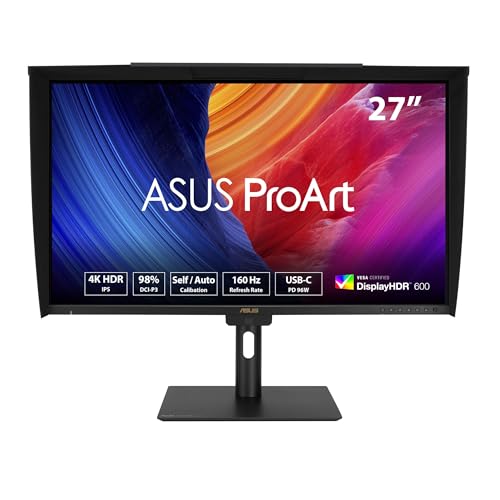
ASUS ProArt PA27UCGE 27 Inch 4K HDR USB-C Professional Monitor
The 27-inch 4K IPS panel pairs a 160Hz refresh rate with a built-in motorized colorimeter and 98% DCI-P3.
Why #4: No single top figure here; its WiseScore comes from its overall specs plus Amazon sales data.
- Screen size
- 27 in
- Native refresh rate
- 160 Hz
- Brightness
- 600 nits
- Resolution
- 4K
- Panel type
- IPS
Good fit if
- You want a 160Hz panel with self-calibration
- You want 98% DCI-P3 with hardware calibration
Look elsewhere if
- You need a 240Hz refresh rate like the ASUS QD-OLED
- You need a 32-inch screen like the BenQ
The 27-inch 4K IPS panel runs at 160Hz with 600 nits brightness and a 3840 by 2160 LuxPixel AGLR display. The panel covers 98% DCI-P3 and 100% sRGB with Delta E <1 color accuracy. A built-in motorized colorimeter supports self and auto calibration with Calman and Light Illusion ColourSpace software. ASUS Light Sync pairs an ambient light sensor with a backlight sensor for consistent color. DisplayPort over USB-C delivers 96W power delivery with daisy-chaining, and Auto KVM switches between two systems. The box includes an HDMI cable, a USB-C cable, and a color pre-calibration report. The warranty runs 5 years with online registration.
Worth the splurge, and what you can skip
Worth the splurge
- A 240Hz QD-OLED panel. The ASUS QD-OLED is the pick with the 240Hz panel, so choose it when your grading work needs the highest native refresh rate here.
- A built-in motorized colorimeter. The ASUS 27-inch is the pick with the built-in motorized colorimeter, so choose it when your calibration routine needs self and auto calibration in the monitor.
Fine to skip
- A 32-inch screen. If a 27-inch screen already fits your desk, the Acer and the ASUS 27-inch already cover 4K grading with Delta E under 1, so the larger panel adds size you would not use.
- Thunderbolt 4 with 96W. If your setup runs on USB-C alone, the Acer already covers 4K signal and 90W charging in one cable, so Thunderbolt 4 adds a connection you would not use.
Deciding factors for computer monitors
Color gamut and Delta E accuracy
Gamut coverage separates these four panels. For the BenQ, coverage is 99% P3 with 100% sRGB and Rec.709. On the ASUS QD-OLED, coverage reaches 99% DCI-P3 with 100% sRGB and BT.2020. Acer coverage is 99% Adobe RGB with 96% DCI-P3. ASUS 27-inch coverage is 98% DCI-P3 with 100% sRGB. Delta E figures sit at 1 or below across the four picks. BenQ accuracy holds at Delta E ≤1. ASUS QD-OLED accuracy holds at Delta E <1. Acer and ASUS 27-inch accuracy each hold Delta E <1. The BenQ and both ASUS picks use hardware calibration, while the Acer ships factory calibrated and Calman verified. The delivery standard decides the gamut: P3 for the BenQ, Adobe RGB for the Acer, and DCI-P3 for the ASUS picks at 99% and 98%.
Refresh rate and brightness
Native refresh rates span 72Hz to 240Hz across the four picks. In 4K mode the Acer runs at a native 72Hz and reaches 144Hz only in 1080p mode, so keep its 72Hz native figure separate from the 144Hz mode figure. BenQ refresh rate is 120Hz, and the ASUS 27-inch runs at 160Hz. At the top end, the ASUS QD-OLED runs at 240Hz. Brightness runs from 400 nits on the Acer to 600 nits on the ASUS 27-inch. Peak brightness on the ASUS QD-OLED reaches 1000 nits. The BenQ gives a 3000:1 contrast ratio with HDR600 instead of a brightness figure. The ASUS QD-OLED panel measures 31.5 inches at 4K UHD. Response time is stated only for the ASUS QD-OLED at 0.1 ms.
Calibration, connectivity, and warranty
Calibration tools differ across the four. The BenQ stores color data in the display hardware with a 16-bit 3D LUT. ProArt hardware calibration with Calman Ready certification comes on the ASUS QD-OLED. Factory calibration with an individual report comes on the Acer. A built-in motorized colorimeter on the ASUS 27-inch adds self and auto calibration. Thunderbolt 4 carries 96W power delivery on the BenQ. The ASUS QD-OLED also runs Thunderbolt 4 with 96W power delivery. USB-C delivers 90W on the Acer. USB-C delivers 96W on the ASUS 27-inch. Warranty runs 3 years on the BenQ and the Acer, and 5 years with online registration on both ASUS picks. Both ASUS picks carry the 5-year term; the BenQ and the Acer carry 3 years.
FAQ about computer monitors
Which monitors here cover 99% DCI-P3 or more?
Coverage on the ASUS QD-OLED is 99% DCI-P3. The BenQ covers 99% P3, and the Acer covers 96% DCI-P3 with 99% Adobe RGB. The ASUS 27-inch covers 98% DCI-P3. All four hold Delta E at 1 or below.
What refresh rates do these 4K monitors have?
The ASUS QD-OLED runs at 240Hz. At 160Hz, the ASUS 27-inch runs above the BenQ at 120Hz. The Acer runs at a native 72Hz in 4K mode and reaches 144Hz only in 1080p mode. All four panels are 4K.
How much power delivery do the USB-C ports provide?
Thunderbolt 4 delivers up to 96W on the BenQ. The ASUS QD-OLED also uses Thunderbolt 4 with up to 96W. USB-C delivers 96W on the ASUS 27-inch. The Acer delivers 90W over USB-C. Check the wattage against the laptop you charge through the monitor.
Bottom line
Keep comparing
More computers & office guides, ranked with the same WiseScore method.

Written by Nathan Reeve, WiseSplurge editor
Specs come from each maker's Amazon listing and were last checked on November 29, 2026. Each WiseScore (out of 10) blends those specs with Amazon sales data. We compare published figures rather than testing products in person.