Best 4 Port Kvm Switch (2026)

We earn a commission when you buy through our links, at no extra cost to you. As an Amazon Associate I earn from qualifying purchases.
Quick answer
Choose the PVBCTCSID KVM Switch if you run 4 computers on 2 monitors: it supports resolutions up to 8K@60Hz with EDID emulation that keeps window order when you switch. The TESmart triple-monitor switch is the pick for 3 monitors, and the DXchip hybrid switch is the pick when one of the 4 computers is a USB-C laptop. The IOGEAR switch covers a single monitor with a 3-year warranty.
Ranked at a glance
| # | Product | Computers supported | Monitors supported | WiseScore | Link |
|---|---|---|---|---|---|
| 1 |  PVBCTCSID KVM SwitchBest Overall | 4 computers | 2 monitors | 9.7/10 | Check on Amazon → |
| 2 |  TESmart 4K@144Hz Displayport KVM SwitchSecond Pick | 4 computers | 3 monitors | 9.5/10 | Check on Amazon → |
| 3 |  ATLAHET 4 Port Dual Monitor HDMI KVM SwitchAlso Consider | 4 computers | 2 monitors | 9.4/10 | Check on Amazon → |
| 4 | 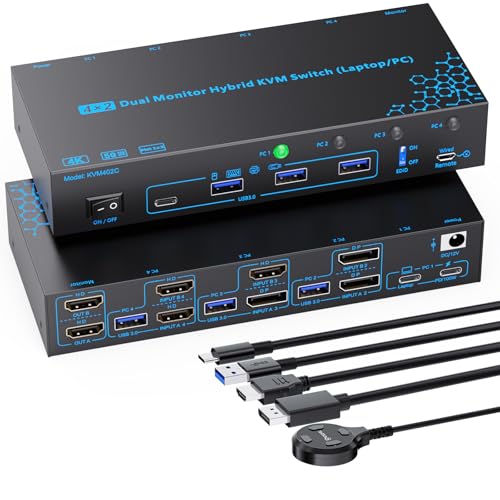 DXchip 2 Monitors 4 Computers KVM SwitchAlso Consider | 4 computers | 2 monitors | 9.3/10 | Check on Amazon → |
| 5 |  IOGEAR 4-Port 4K KVM SwitchAlso Consider | 4 computers | — | 9.2/10 | Check on Amazon → |
| 6 |  TESmart 8K@60Hz HDMI KVM SwitchAlso Consider | 4 computers | 1 monitors | 9.1/10 | Check on Amazon → |

The lineup, one by one
PVBCTCSID KVM Switch
4 computers share 2 monitors at up to 8K@60Hz, with EDID emulation and panel-key plus IR remote switching.
Why #1: No single top figure here; its WiseScore comes from its overall specs plus Amazon sales data.
- Computers supported
- 4 computers
- Monitors supported
- 2 monitors
- Resolution
- 8K@60Hz
Good fit if
- You run 4 computers on 2 monitors at up to 8K@60Hz
- You want EDID emulation that keeps window order when switching
Look elsewhere if
- You need 3 monitors for your desk setup
- You need more than 4 USB ports
The PVBCTCSID switch lets 4 computers share 2 monitors and 4 USB 3.0 devices, with copy and extend modes for the two screens. EDID emulation stores the resolution and refresh rate of each display, so window order stays put when you switch. It supports resolutions up to 8K@60Hz and 4K@144Hz. Switching runs through panel keys or the IR remote, and the metal case holds 4 USB 3.0 ports for keyboards, mice and printers. Each computer needs two HDMI ports, so check your computers first.
TESmart 4K@144Hz Displayport KVM Switch
3 monitors share 4 computers at up to 8K@60Hz, with 1G Ethernet and four ways to switch.
Why #2: Top figure in this lineup for monitors supported (3 monitors). The rest of its WiseScore comes from Amazon sales data.
- Computers supported
- 4 computers
- Monitors supported
- 3 monitors
- Resolution
- 8K@60Hz
Good fit if
- You run 4 computers across 3 monitors
- You want 1G Ethernet sharing on the KVM dock
Look elsewhere if
- You need HDMI inputs instead of DisplayPort
- You need 8K@60Hz over HDMI
The TESmart triple-monitor switch hooks 4 desktops to one keyboard, mouse and 3 monitors, with extended, duplicate or different-PC modes. It delivers resolutions up to 8K@60Hz 4:4:4 and dual 4K@144Hz with HDR10, Dolby Vision and VRR. Built-in EDID emulators stop resolution changes and icon rearrangement during switching. The dock adds 4 USB 3.2 Gen1 ports at 5Gbps, 2 USB 1.1 ports and 1G Ethernet. One-click lock holds KVM, audio or USB focus; switching runs through hotkeys, mouse wheel, IR remote or panel buttons. Each computer needs 3 video connections.
ATLAHET 4 Port Dual Monitor HDMI KVM Switch
4 computers share 2 monitors at up to 8K@60Hz, with EDID emulation and one-button panel switching.
Why #3: No single top figure here; its WiseScore comes from its overall specs plus Amazon sales data.
- Computers supported
- 4 computers
- Monitors supported
- 2 monitors
- Resolution
- 8K@60Hz
Good fit if
- You want one-button switching between 4 computers
- You want plug-and-play setup with no drivers to install
Look elsewhere if
- You need 3 monitors for your desk setup
- You need hotkey switching from the keyboard
The ATLAHET switch lets 4 computers share 2 monitors and 4 USB 3.0 devices, with duplicate and extended modes for the two screens. EDID emulation recognizes and saves monitor parameters, so windows stay in place when you switch computers. It supports up to 8K@60Hz and 4K@120Hz. Four USB 3.0 ports move data at up to 5Gbps for mice, keyboards, printers, webcams and flash drives. Switching runs through panel buttons or the infrared remote. It needs a 12V1A external power supply in use.
DXchip 2 Monitors 4 Computers KVM Switch
A hybrid USB-C, DisplayPort and HDMI switch that shares 2 monitors across a laptop and 3 desktops.
Why #4: No single top figure here; its WiseScore comes from its overall specs plus Amazon sales data.
- Computers supported
- 4 computers
- Monitors supported
- 2 monitors
- Resolution
- 3840*2160
Good fit if
- You mix a USB-C laptop with 3 desktops on 2 monitors
- You charge the laptop through the PD port at 73 to 85W while you work
Look elsewhere if
- You need 8K@60Hz resolution for your main monitor
- You need more than 4 USB ports
The DXchip hybrid switch takes 4 input combinations at once: a laptop over USB-C with PD, and 3 desktops over DisplayPort and HDMI. One-click switching moves one laptop and 3 desktops across 2 monitors and 4 USB 3.0 peripherals. It supports dual 4K (3840*2160) at 60Hz, plus 2560*1440 up to 120Hz and 1920*1080 up to 144Hz. An EDID on/off dial enables or disables EDID, and the 100W PD port charges the laptop while you work. Four USB 3.0 ports move data at up to 5Gbps, with panel LED button or wired remote switching. A 12V/1A external power adapter supplies the switch.
IOGEAR 4-Port 4K KVM Switch
4 computers share one monitor at up to 4096x2160 at 60 Hz, with a 3-year warranty.
Why #5: No single top figure here; its WiseScore comes from its overall specs plus Amazon sales data.
- Computers supported
- 4 computers
- Resolution
- 4096x2160 @60 Hz
- Warranty
- 3 years
Good fit if
- You run 4 computers on a single monitor
- You want hotkey switching from the keyboard
Look elsewhere if
- You need 2 monitors for your desk setup
- You need 8K@60Hz resolution for your main monitor
The IOGEAR switch controls 4 PCs from a single monitor, keyboard, mouse and speaker, with up to 2 USB peripherals. Video runs up to 4096x2160 at 60 Hz or 5120x1440 at 60Hz over HDMI 2.0. DynaSync keeps the resolution and window layout steady when you switch ports. Computer selection runs through a remote port selector, hotkeys or a USB mouse, with power-on detection switching to the next active computer. The box holds 4 HDMI cables, 4 USB 2.0 cables, a remote port selector and a power adapter. It carries a 3-year warranty.
TESmart 8K@60Hz HDMI KVM Switch
4 computers share one monitor at up to 8K@60Hz, with an ADI chip and custom hotkey switching.
Why #6: No single top figure here; its WiseScore comes from its overall specs plus Amazon sales data.
- Computers supported
- 4 computers
- Monitors supported
- 1 monitors
- Resolution
- 8K (4320p)@60Hz
Good fit if
- You run 4 computers on one monitor for gaming
- You want custom hotkeys for switching
Look elsewhere if
- You need 2 monitors for your desk setup
- You need DisplayPort inputs for your monitors
The TESmart single-monitor switch runs 4 computers through one monitor at up to 8K (4320p) at 60Hz, with 4K at 60Hz, 120Hz and 144Hz. The ADI chip gives each port a full signal processing module with HDCP and EDID emulation. Custom hotkeys let any keyboard key trigger switching, alongside a front panel button, mouse wheel and IR remote. Dynamic HDR, HDR10+, Dolby Vision, VRR and ALLM suit gaming, and the integrated microphone and left/right audio output keep headphones active during a switch. All input cables come in the box.
Worth the splurge, and what you can skip
Worth the splurge
- A third monitor. The TESmart triple-monitor switch is the pick with 3 monitors, so choose it when your desk runs 3 screens and 2 monitors are not enough.
- 100W PD laptop charging. The DXchip switch is the pick with a 100W PD port, so choose it when one of your 4 computers is a laptop that charges over USB-C.
Fine to skip
- 1G Ethernet sharing. If your network already runs through a separate switch, the PVBCTCSID with 4 USB 3.0 ports and EDID emulation already covers switching, so the 1G Ethernet on the TESmart triple-monitor switch adds a port you would not use.
- A 3-year warranty. If warranty length is not part of your decision, the TESmart triple-monitor switch with 3 monitors and up to 8K@60Hz already covers a 4-computer desk, so the IOGEAR 3-year warranty is not the deciding figure.
Deciding factors for KVM switches
Count the monitors first
Monitor count splits this lineup. The PVBCTCSID, ATLAHET and DXchip switches each run 2 monitors, the TESmart triple-monitor switch runs 3 monitors, and the IOGEAR and TESmart single-monitor switches run 1 monitor. All six control 4 computers, so the monitor figure decides the fit. The 3-monitor TESmart switch needs 3 video connections from each computer, while the 2-monitor switches need 2 video cables per desktop. The PVBCTCSID and ATLAHET switches share 2 displays with copy and extend modes, and the DXchip switch shares 2 monitors across a laptop and 3 desktops. Each computer on the PVBCTCSID needs two HDMI ports; the IOGEAR carries a 3-year warranty.
Resolution and refresh rate
Resolution tops out at 8K@60Hz on four of these switches: the PVBCTCSID, the TESmart triple-monitor switch, the ATLAHET and the TESmart single-monitor switch. The DXchip switch tops out at dual 4K at 3840*2160 at 60Hz, and the IOGEAR tops out at 4096x2160 at 60 Hz or 5120x1440 at 60Hz. The PVBCTCSID adds 4K@144Hz, the TESmart triple-monitor switch delivers dual 4K@144Hz, and the TESmart single-monitor switch supports 4K at 144Hz. The DXchip switch supports 2560*1440 up to 120Hz and 1920*1080 up to 144Hz. The ATLAHET also supports 4K@120Hz, and the TESmart triple-monitor switch is backward compatible with 4K@60Hz and 120Hz. The TESmart single-monitor switch also transmits 7680x4320 at 60Hz 4:4:4 with DSC technology.
Switching methods and extras
Switching methods differ. The PVBCTCSID switches through panel keys or an IR remote, the ATLAHET through panel buttons or an infrared remote, and the DXchip through a panel LED button or a wired remote. The TESmart triple-monitor switch offers hotkeys, mouse wheel, IR remote and panel buttons, and the TESmart single-monitor switch adds custom hotkeys. The IOGEAR switches through a remote port selector, hotkeys or a USB mouse. Extras split them too: the TESmart triple-monitor switch adds 1G Ethernet, the DXchip adds a 100W PD port, and the TESmart single-monitor switch adds a microphone and left/right audio output. The IOGEAR box holds 4 HDMI cables and 4 USB 2.0 cables.
FAQ about KVM switches
How many monitors can a 4-port KVM switch run?
It depends on the switch. The PVBCTCSID, ATLAHET and DXchip switches run 2 monitors, the TESmart triple-monitor switch runs 3 monitors, and the IOGEAR and TESmart single-monitor switches run 1 monitor. All six control 4 computers.
What resolution do these KVM switches support?
Four support up to 8K@60Hz: the PVBCTCSID, both TESmart switches and the ATLAHET. The DXchip supports dual 4K at 3840*2160 at 60Hz, and the IOGEAR supports 4096x2160 at 60 Hz or 5120x1440 at 60Hz over HDMI 2.0.
Can I switch computers with a keyboard hotkey?
Yes, on three of these switches. The TESmart triple-monitor switch and the TESmart single-monitor switch support hotkeys, and the single-monitor switch lets any keyboard key trigger switching. The IOGEAR also switches through hotkeys. The ATLAHET does not support hotkey switching.
Bottom line
Keep comparing
More computers & office guides, ranked with the same WiseScore method.

Written by Nathan Reeve, WiseSplurge editor
Specs come from each maker's Amazon listing and were last checked on November 29, 2026. Each WiseScore (out of 10) blends those specs with Amazon sales data. We compare published figures rather than testing products in person.