Best 27 Inch Monitor with Displayport (2026)

We earn a commission when you buy through our links, at no extra cost to you. As an Amazon Associate I earn from qualifying purchases.
Quick answer
The Acer Nitro 27in FHD 1920x1080 IPS 200Hz Gaming Monitor suits gamers who want a 200Hz refresh rate and a 0.5ms response time on a 27-inch IPS panel with DisplayPort. Refresh rate is the widest gap here: the second Acer reaches up to 275Hz, the msi reaches 100Hz, and the ASUS tops out at 75Hz. Resolution also separates the picks, since the second Acer is the one with 2560 x 1440.
Ranked at a glance
| # | Product | Screen size | Native refresh rate | WiseScore | Link |
|---|---|---|---|---|---|
| 1 | 27 in | 200 Hz | 9.6/10 | Check on Amazon → | |
| 2 | 27 in | — | 9.5/10 | Check on Amazon → | |
| 3 | 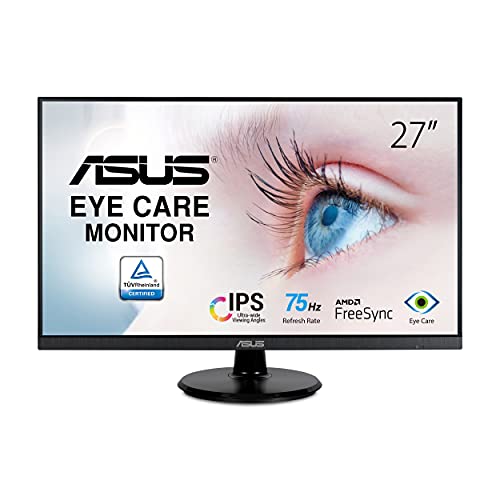 ASUS VA27DQ 27 Inch 1080P Computer MonitorAlso Consider | 27 in | — | 9.4/10 | Check on Amazon → |
| 4 |  msi PRO MP272LE 27-inch IPS 1920 xAlso Consider | 27 in | 100 Hz | 9.2/10 | Check on Amazon → |
The lineup, one by one
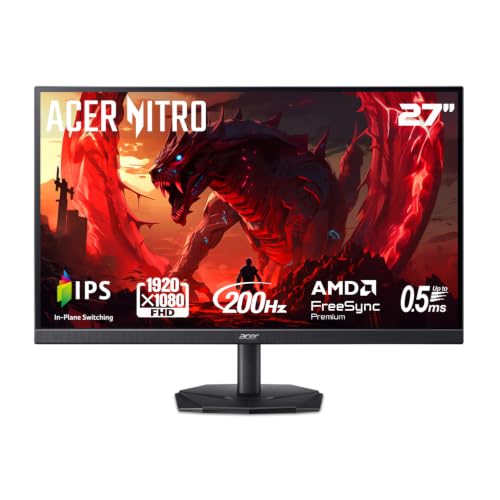
Acer Nitro 27in FHD 1920x1080 IPS 200Hz Gaming Monitor
The 200Hz refresh rate, 0.5ms response time and 99% sRGB coverage make this Acer the gaming pick for fast 1080p play.
Why #1: No single top figure here; its WiseScore comes from its overall specs plus Amazon sales data.
- Screen size
- 27 in
- Native refresh rate
- 200 Hz
- Resolution
- 1920 x 1080
- Panel type
- IPS
- Response time
- 0.5 ms
- Warranty
- 3 Years
Good fit if
- You game at 200Hz on a 27-inch IPS panel
- You want 99% sRGB coverage for color-critical work
Look elsewhere if
- You need the 2560 x 1440 resolution of the second Acer
- You need the 275Hz refresh rate of the second Acer
This Acer Nitro KG271 X1biip has a 27-inch IPS panel at 1920 x 1080 with a native 200Hz refresh rate and a 0.5ms GTG response time. AMD FreeSync Premium syncs the monitor's frames with the graphics card's frames to cut screen tearing. The panel supports sRGB 99% for color-critical projects, and the zero-frame design frees screen space. A bluelight filter and flickerless technology are built in. The warranty covers 3 years of parts and labor.

Acer Nitro 27in QHD 2560x1440 IPS 275Hz Gaming Monitor
The 2560 x 1440 resolution, up to 275Hz refresh rate and HDR 10 support define this Acer for gaming and color work.
Why #2: No single top figure here; its WiseScore comes from its overall specs plus Amazon sales data.
- Screen size
- 27 in
- Brightness
- 250 nits
- Resolution
- 2560 x 1440
- Panel type
- IPS
- Response time
- 0.5 ms
- Warranty
- 3 year
Good fit if
- You want 2560 x 1440 resolution at up to 275Hz
- You want built-in 2W speakers and an included DisplayPort cable
Look elsewhere if
- You want the 99% sRGB coverage of the first Acer
- You want the VGA port of the ASUS
This Acer Nitro KG271U Z2bmiipx has a 27-inch IPS panel at 2560 x 1440 with a refresh rate of up to 275Hz using DisplayPort and 144Hz using HDMI. The 0.5ms GTG response time and AMD FreeSync Premium keep fast-moving action smooth. Two speakers deliver 2 watts each, and the stand tilts from -5 to 25 degrees. Ports include 1 x DisplayPort 1.4, 2 x HDMI 2.0 and 1 x audio out, and a DisplayPort cable and HDMI cable are included. The monitor is VESA mounting compliant at 100 x 100mm. The warranty covers 3 years of parts and labor.
ASUS VA27DQ 27 Inch 1080P Computer Monitor
The 75Hz refresh rate, VGA port and 2W speakers make this ASUS the connection-flexible pick for everyday desktop use.
Why #3: No single top figure here; its WiseScore comes from its overall specs plus Amazon sales data.
- Screen size
- 27 in
- Resolution
- 1920 x 1080
- Panel type
- IPS
- Warranty
- 3 Year
Good fit if
- You want DisplayPort, HDMI and VGA on one 27-inch panel
- You want Adaptive-Sync with a 75Hz refresh rate
Look elsewhere if
- You need a refresh rate above 75Hz
- You need the 100Hz refresh rate of the msi
This ASUS VA27DQ has a 27-inch Full HD 1920 x 1080 IPS panel with a 178-degree wide viewing angle and a refresh rate of up to 75Hz with Adaptive-Sync/FreeSync. Connections include HDMI, DisplayPort, D-sub and 2W x 2 stereo speakers. Flicker-free and low blue light technologies carry TV Rheinland certification. The frameless design is VESA mountable, and the tilt-adjustable stand moves from +23 to -5 degrees. The monitor supports Adaptive-Sync with NVIDIA GeForce graphics cards and FreeSync with AMD Radeon graphics cards. The warranty covers 3 years with Advanced Replacement and Repair service.
msi PRO MP272LE 27-inch IPS 1920 x
The 100Hz refresh rate, 1ms response time and DisplayPort 1.2a make this msi a steady office monitor with light gaming ability.
Why #4: No single top figure here; its WiseScore comes from its overall specs plus Amazon sales data.
- Screen size
- 27 in
- Native refresh rate
- 100 Hz
- Resolution
- 1920 x 1080
- Panel type
- IPS
- Response time
- 1 ms
- Warranty
- 3 Years
Good fit if
- You want a 100Hz IPS panel with DisplayPort 1.2a
- You want tool-free assembly and a cable clip on your desk
Look elsewhere if
- You need the 200Hz refresh rate of the first Acer
- You need the 2560 x 1440 resolution of the second Acer
This msi PRO MP272LE has a 27-inch IPS panel at 1920 x 1080 with a 100Hz refresh rate and a 1ms response time. The 4-side slim bezel design suits multi-monitor setups, and Adaptive Sync matches the refresh rate to the GPU frame output. HDMI 1.4b supports Full HD at 100Hz, while DisplayPort 1.2a provides high-bandwidth video output. The tilt-adjustable stand moves from -5 to 20 degrees, assembly is tool-free, and an integrated cable clip keeps the desk organized. MSI Power Link syncs the monitor power with the PC. Flicker Free and Low Blue Light carry TUV Rheinland certification, and Eye-Q Check provides a vision assessment tool. The warranty covers 3 years.
Worth the splurge, and what you can skip
Worth the splurge
- A 275Hz refresh rate. The second Acer is the pick with a refresh rate of up to 275Hz using DisplayPort, so choose it when your games need a refresh rate of up to 275Hz.
- A 2560 x 1440 resolution. The second Acer is the pick with 2560 x 1440 resolution, so choose it when your work needs more pixels than the 1920 x 1080 panels offer.
Fine to skip
- A VGA port. The ASUS is the pick with a VGA port, but the first Acer, second Acer and msi connect through DisplayPort and HDMI, so buyers with modern video outputs already have the ports they need.
- Built-in speakers. The second Acer and the ASUS have built-in speakers, but buyers with separate speakers or headphones already have audio covered without them.
Deciding factors for computer monitors
Refresh rate and DisplayPort speed
The first Acer runs at a native 200Hz, the second Acer reaches up to 275Hz using DisplayPort and 144Hz using HDMI, the msi runs at 100Hz, and the ASUS tops out at 75Hz. That spread is the main decision on this page: the two Acers refresh at higher rates than the msi and the ASUS. Response time follows the same split, with both Acers at 0.5ms GTG and the msi at 1ms. If your games need a 275Hz panel, the second Acer reaches up to 275Hz using DisplayPort, while the first Acer runs at a native 200Hz. All four panels measure 27 inches.
Resolution and color coverage
The second Acer is the pick with 2560 x 1440 resolution, while the other three picks have 1920 x 1080. For color work, the first Acer supports sRGB 99% and the second Acer supports DCI-P3 90% with HDR10 and 250 nits of brightness. The second Acer pairs its higher resolution with a refresh rate of up to 275Hz, so it covers both sharpness and speed in one panel. The first Acer pairs 1920 x 1080 with sRGB 99%, so it covers color-critical projects at the standard resolution. Choose the higher resolution when your work shows fine detail, and choose sRGB 99% when your projects need that color space.
Tilt, mounting and desk setup
The second Acer tilts from -5 to 25 degrees and is VESA mounting compliant at 100 x 100mm, with a DisplayPort cable and HDMI cable included. The ASUS tilts from +23 to -5 degrees and is VESA mountable with a frameless design. The msi tilts from -5 to 20 degrees, assembles tool-free, and has an integrated cable clip plus MSI Power Link to sync monitor power with the PC. The first Acer is VESA mountable with a zero-frame design that frees screen space. All four carry a 3-year warranty, so the desk setup decision turns on tilt range, included cables and tool-free assembly.
FAQ about computer monitors
What refresh rates do these 27-inch monitors offer?
The first Acer runs at a native 200Hz, the second Acer reaches up to 275Hz using DisplayPort and 144Hz using HDMI, the msi runs at 100Hz, and the ASUS tops out at 75Hz. All four panels measure 27 inches.
Which of these monitors has a 2560 x 1440 resolution?
The second Acer, the Acer Nitro KG271U Z2bmiipx, is the pick with 2560 x 1440 resolution. The other three picks have 1920 x 1080 resolution. All four use IPS panels, and all four measure 27 inches.
What warranty comes with these monitors?
Each of the four monitors carries a 3-year warranty. The first Acer covers 3 years of parts and labor, the second Acer covers 3 years of parts and labor, the ASUS covers 3 years with Advanced Replacement and Repair service, and the msi covers 3 years.
Bottom line
Keep comparing
More computers & office guides, ranked with the same WiseScore method.

Written by Nathan Reeve, WiseSplurge editor
Specs come from each maker's Amazon listing and were last checked on November 29, 2026. Each WiseScore (out of 10) blends those specs with Amazon sales data. We compare published figures rather than testing products in person.